
Agentforce has the power to revolutionize your business operations. But success depends on how well you implement it.
Without a clear plan, it’s easy to miss out on Agentforce’s full potential.
And the stakes are well documented.
Gartner projected that through 2026, 60% of AI projects would be abandoned for lack of AI-ready data.
Our own 2025 survey of CROs found the gap sitting inside revenue teams: half felt confident in their CRM data, but only 20% of the RevOps leaders who manage that data agreed.
To help you navigate this journey, we’ve collected some Agentforce implementation best practices, general AI-readiness tips, and practical advice and tips from our partner experts who’ve helped businesses like yours maximize their salesforce investment.
Here’s how to implement Agentforce like a pro.
The Agentforce Readiness Gate: 5 Data Checks to Run
A strong foundation is key to getting the most out of Agentforce. If you don’t already know how to establish this strong starting point, or still find yourself asking “what is Agentforce,” check out our guide where we dive into its core components and the essential steps to maximize its impact.
With those basics in place, let’s shift focus to the six data checks you need to run before you configure any agent.
1. Duplicate accounts and contacts
Salesforce duplicate rules only run when a record is created or edited. They never re-scan what’s already in the org, and the native merge wizard handles three records at a time.
An agent reads those existing duplicates at face value. When it rolls up pipeline or activity by account, every duplicate counts the same customer again, and the total it reports comes back inflated.
Clearing them takes a scheduled mass dedupe with match and field-retention rules, the reactive side of Salesforce data cleansing that native rules skip.
Run it on a cadence, the way the YMCA of San Diego County did to cut duplicates by over 75%.
I was spending 90% of my days working on duplicates, and I might have only been able to eliminate 20 or 30 in a day
Joyce Caudillo, Operational Software Manager at the YMCA of San Diego County
2. Account hierarchy structure
The native account hierarchy limitations start with Parent Account itself: it’s a lookup field with no roll-up, so every parent-child link exists only because someone populated it by hand.
You know that Google and YouTube both belong to Alphabet, but if your CRM doesn’t have the Alphabet parent record, your org will treat all three as separate accounts.
An agent downstream inherits that flat structure.
Ask it what a customer spends with you, and it returns the total on the one account record it queries, without the subsidiaries rolled in.
And better or more data isn’t the fix.
Account hierarchy data from a data provider does name the relationships, telling you which companies roll up to which parent, but someone still has to write those links into the Parent Account field.
Naming the relationship and building it in Salesforce are two different jobs. Building account hierarchies means resolving every account to its global ultimate parent before agents aggregate anything. And you have to do it for every subsidiary in the tree, including the ones no rep ever linked.
3. Field consistency
Agents filter and classify on field values. So if you have free-text entries where picklists like industry, region, or segment, should go, every prompt or topic instruction that references them breaks.
The cheap and fast fix is turning on State and Country/Territory picklists so location stops being free text. The better, longer-lasting work is normalizing the variants your org has already accumulated, merging “Enterprise,” “ENT,” and “Ent Tier 1” into one standard value an agent can group on.
Normalizing values like these is core RevOps data management, and each critical field should also get a named owner who keeps it clean after launch.
4. Completeness of GTM fields
Agents can’t infer what the record doesn’t hold. If the industry, employee count, or account owner is blank, the agent either skips the record or fills the gap with a guess.
Incomplete enrichment is the industry’s sore spot: 73% of operators flagged it as a top data challenge in our 2025 RevOps AI survey.
Enrichment waterfalls that blend providers fill those gaps, so one source covers what the next one misses. No single vendor has every field for every account, which is why having multiple fallback vendors is more important than any one provider.
Validation rules can help here, but resist the urge to over-correct.
A wall of mandatory fields at save makes your life a little easier, but it can push sales reps to enter junk just to move forward and keep velocity moving, while the agent inherits the mess.
5. Data staleness
Revenue, headcount, and address fields age, and M&As can change account hierarchies fast.
Salesforce has no built-in staleness indicator, so a three-year-old revenue figure looks exactly as current as one entered yesterday.
The fix is to treat freshness as data you actually store.
Monitoring for M&A signals with date-window verification catches the changes your CRM hasn’t heard about. Keeping a confidence score and source URL on every enriched value lets you audit where a number came from and when.
AI doesn’t question your data. It acts on it. Every company we talk to is under pressure to deploy AI, and almost every one of them is aware that their CRM data isn’t ready.
David Nelson, CEO at Traction Complete
3 Agentforce Implementation Best Practices
1. Enable your team
Agent configuration is admin work;adoption lives with the people who read agent outputs and act on them.
Two roles decide whether that adoption sticks: someone who owns the agents, and the Revenue Architect who owns the data they run on. For the Revenue Architect, owning that data means data stewardship, approving what agents write to the fields that route leads and pay commission
- Identify key stakeholders. Someone has to own Agentforce in your org: a Sales Operations or RevOps leader who aligns agent configurations with business goals and monitors performance metrics during rollout.
- Assign a data steward, too. An agent rollout puts data problems in front of you that nobody had catalogued.
Someone needs to own the queue of flagged records, approve or refuse suggested fixes, and feed those decisions back into your data rules. - Tailor training to roles. Show Customer Success teams how Agentforce prioritizes support tickets by urgency or customer tier; walk Sales teams through account hierarchies to spot expansion opportunities.
- Provide hands-on practice. A sandbox lets teams practice interpreting agent outputs and refining prompts before anything touches production data.
2. Map workflows for scalability and growth
Before you hand an agent anything, map how work moves through your team today. Sort each step by how much judgment it takes.
Fixed-variable work belongs in a deterministic Flow; open-ended work that has to read context fits an agent.
Agentic firmographic account enrichment is a good test case.
Today someone opens each new account, researches its industry, revenue, and employee count, and types them in by hand, then repeats the pass when the values go stale. An agent does it from the name and domain:
- Fills in industry (NAICS), revenue range, and employee count
- Assigns a buyer persona from the job title and scores the account against your ICP
- Attaches a confidence score to each value and flags the shaky ones for review
- Writes the approved values back to Salesforce
Traction Complete’s Data Agents do exactly this. Every value they add carries a confidence score and a source citation, and you review both before you approve the write.
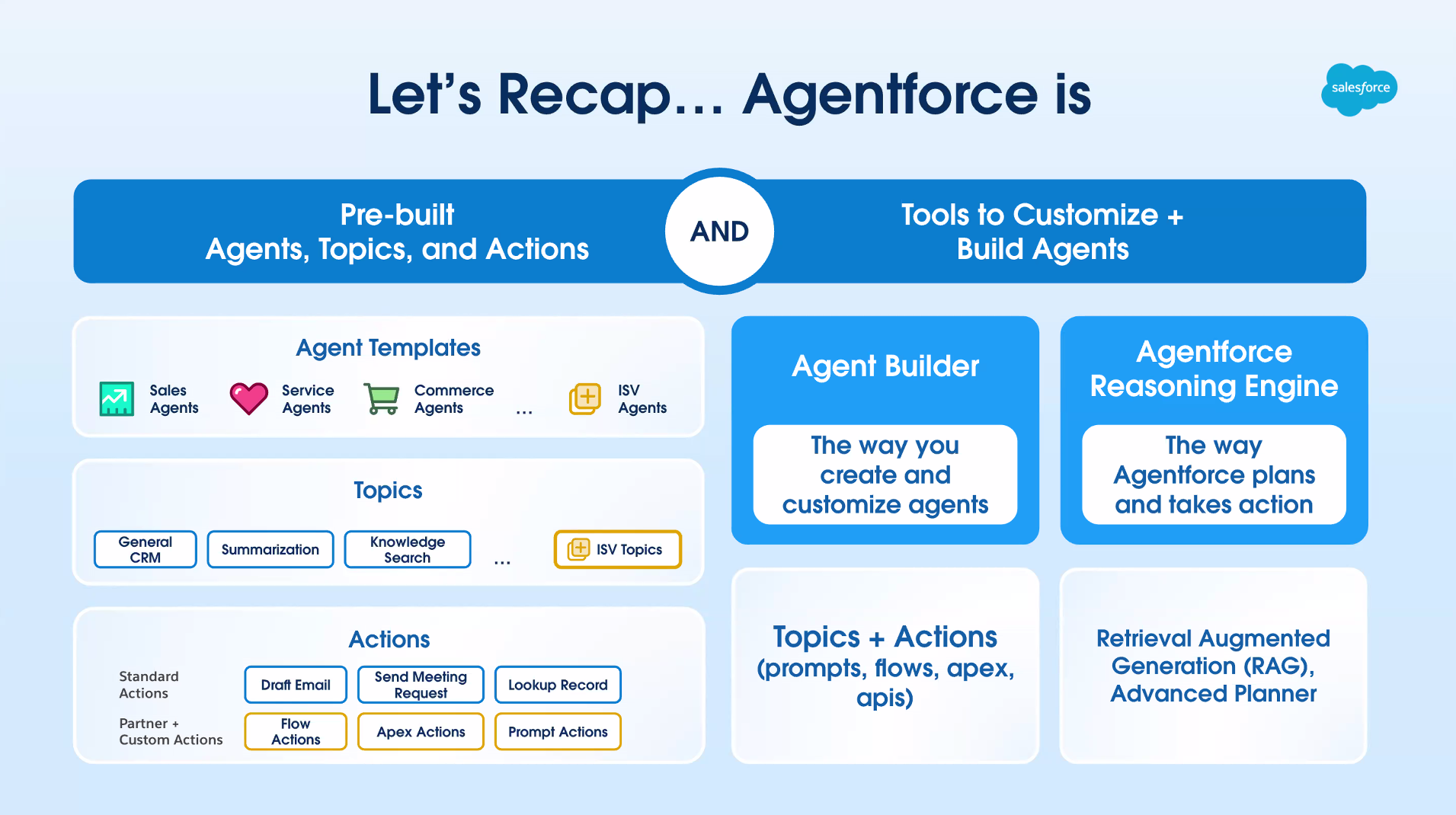
3. Put partner expertise to work with pre-built prompts, topics, and actions
Building prompts, topics, and actions in-house takes real time: you need to define precise logic, align it with your data structures, test and fine-tune outputs, train the team, and maintain everything as your GTM motion changes.
Our own survey findings support the caution: in our 2025 survey, not one RevOps leader rated their in-house AI tools “extremely successful.”
Here’s why creating DIY solutions can be challenging:
- You need to define precise logic. Crafting effective agents means understanding the nuances of natural language, user intent, and business context.
A seemingly simple prompt to generate follow-up emails still needs to account for customer tone, sales stage, and industry. And mapping these nuances requires planning and testing. - You have to align your solution with data structures. Your agents must interact seamlessly with your CRM data, including structured fields, unstructured text, and relationships between records.
Making all this accessible and actionable to your agents requires manually cleansing, connecting, and orchestrating your data, which delays implementation. - You need to test and fine-tune. AI outputs are rarely perfect on the first try.
You’ll need to test each prompt and topic thoroughly, tweaking instructions and parameters to achieve your desired outcome. This trial-and-error process is easy for simple workflows, but quickly turns into a time sink with more complex ones. - Your team needs training and onboarding. A custom setup requires training your team to use these agents effectively. This means creating guides, running practice sessions, and troubleshooting issues — all of which add to the time investment.
- You need to perform ongoing maintenance. Businesses and GTM motions change, and your custom-built prompts and topics will need regular updates to stay relevant.
Without a dedicated team or resources, keeping them updated can quickly become a burden.
But pre-built Agentforce assets from Salesforce experts and partners can bridge the gap.
They’re built on real-world use cases, and the partners who build them keep the assets current with each Agentforce release.
Pre-built topics
Topics are playbooks for agents: they define what an agent is responsible for and which actions it can take in a scenario.
A partner-designed “Customer Support” topic already includes instructions for classifying, prioritizing, and routing cases, including escalating negative-sentiment cases straight to account managers.
A pre-built topic for “Customer Support” might automatically classify and route cases based on urgency and complexity. For example, it can escalate cases flagged with negative sentiment directly to account managers.
A partner-designed topic will already include detailed instructions for classifying, prioritizing, and routing cases — saving you the effort of manually mapping out workflows.
Prompt templates
Prompts are the instructions agents follow when generating outputs like emails, summaries, and recommendations.
A partner template for post-demo follow-ups pulls CRM data like company name, industry, and recent interactions, and arrives pre-tested for tone and context.
Pre-built actions
Actions allow agents to execute specific tasks, like updating records, triggering workflows, and integrating with external systems and tools.
Pre-built actions can include custom solutions powered by APIs, enabling Agentforce to interact with your broader tech stack and automate workflows.
Imagine a sales team using Agentforce to analyze meeting transcripts from tools like Gong and chat transcripts from chatbots.
A pre-built prompt and action template could include:
- Keyword detection. Agentforce scans meetings and calls transcripts for intent-driven phrases like “schedule a demo,” or “I’d like to learn more.”
- Zoom API triggers. If any transcript mentions scheduling a demo, the agent automatically creates a Zoom meeting invite, sends it to the prospect, and logs the event in Salesforce.
- Sending a follow-up email. If the transcripts show general interest without specifically mentioning a demo, the agent triggers an email follow-up via Salesforce. This email might include personalized context from the conversation, like a recap of key points or relevant resources.

See How Three Revenue Teams Fixed Their Salesforce Data Layer
See how Fivetran’s Senior Director of Global Revenue Operations, GitHub’s Senior Director of Marketing Operations, and Inchcape’s Head of Data as they explain how they fixed their Salesforce data layers.
Discover how they consolidated Salesforce through M&A, kept master data accurate under outside scrutiny, and held a source of truth at the front of the funnel, plus the five plays every Revenue Architect came back to.
Preparing for Agentforce: Q&A with Salesforce Implementation Experts – Delegate

To learn more about what makes implementations successful, we spoke with Robert Sur, Co-founder and CEO of boutique Salesforce Implementation firm Delegate about what challenges to expect with Agentforce and how he anticipates it changing the CRM landscape.
Q: What are your thoughts on Agentforce, and how do you support its implementation?
Agentforce represents Salesforce’s focused approach to integrating AI into business operations, and its potential hinges on thoughtful implementation.
Successful adoption of any technology, including AI, requires clear context and aligned intent. For Agentforce, that means understanding what you want each agent to do (“jobs-to-be-done”) and providing clear instructions on how Agentforce should interpret your information.
Unlike large language models like OpenAI’s, which are trained on massive, generalized datasets, Agentforce operates within the scope of your organization’s Salesforce data. This makes the quality of your data not just important but foundational.
Clean, consistent, and well-structured data enables Agentforce to generate accurate insights and avoid costly errors. Organizations must establish and sustain strong data governance practices to ensure automation workflows run smoothly and produce meaningful outcomes.
Equally critical is fostering alignment across teams to ensure everyone understands the role of Agentforce in their processes. This involves continuous communication, training, and refinement, which collectively maximize the impact of this powerful AI-driven tool.
Q: What challenges should companies anticipate as they roll out Agentforce with custom integrations (and actions, topics, AI models, etc)?
The main challenge lies in data management and governance. Successful Agentforce deployment hinges on clean, high-quality data and a culture centered around data ownership and continuous oversight.
Companies must prioritize building a consistent and ongoing practice for maintaining data hygiene — not just as a one-time initiative but as an ingrained part of their operational rhythm.
Teams must define and enforce clear data standards that address inconsistencies, gaps, and ambiguities. Equally important is educating teams on how the data they manage impacts AI outcomes, fostering accountability and collaboration across departments.
Companies should also evaluate how their integrations scale as custom actions, topics, and AI models are introduced. Anticipating changes in data volume or complexity keeps Agentforce operating efficiently as workflows evolve.
Q: How do SI firms like yours anticipate Agentforce changing the Salesforce landscape?
A company’s data proficiency will be more important than ever.
Companies that do not prioritize structured, ongoing data management risk falling behind, more so now than ever.
With Agentforce automating complex, multi-step tasks, businesses need robust data practices to stay competitive.
Those who neglect this foundation will find themselves unable to leverage the full potential of Agentforce, leading to inefficiencies and missed opportunities in automation and decision-making.
Data Readiness is a Marathon You’re Always Running
You might be ready for an agentic launch, but your data doesn’t stay ready forever.
Accounts merge, revenue shifts, and new records land daily, and the drift the gate caught the first time creeps back.
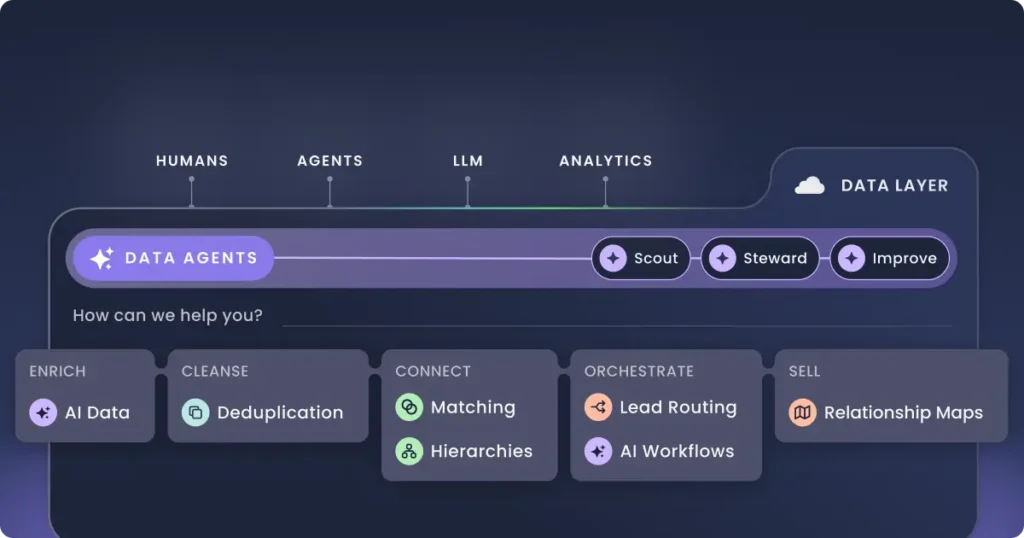
Data Agents keep the Salesforce data layer ready as that happens. They cleanse duplicates, connect subsidiaries to their global ultimate parent, and enrich the fields your agents read, on a schedule instead of a one-time cleanup.
Every change they suggest carries a confidence score, the reasoning, and its source, and a human approves it before it writes back. You keep the audit trail, and the records stay trustworthy as the org changes.
Pair that with the readiness gate and your partners’ pre-built assets, and Agentforce keeps acting on data you can stand behind, at launch and a year later.