
There is one number behind every data quality requirement for AI, and it is zero: zero margin for error.
99.99% is the number vendors reach for when they want a figure to sound absolute.
It translates to 52 minutes of downtime a year, and it sits in the same range as the National Weather Service estimates that lightning strikes 1 in 15,300 people living in the United States in their lifetime.
99.99% is almost a guarantee; the odds are rare enough to ignore.
But would you feel comfortable if an AI or agentic tool had the same reliability rates?
Napkin math will tell you that an agent processing 100,000 records a month at 99.99% accuracy still writes 10 wrong values every month — or 120 a year.
120 a year sounds negligible, even fixable within a few afternoons. But the number understates the damage.
A wrong value doesn’t only stay on the record it landed on, but affects reporting, forecasting, and everything else it touches downstream.
Ernesto Valdes, CTO at Traction Complete, and Chris Pickering, Manager of Sales Operations at Snap Inc., spent a Dreamforce 2026 session on how to close that gap. They presented together under the title “0 Margin for Error,” and the ten data quality requirements for AI below are their route to that number.
The 10 Data Quality Requirements for AI
1. Audit every field and metadata
Start by finding out where the data you care about actually lives, and what condition it’s in.
Valdes called this starting with the basics. You look across your connected systems and run an exploratory project to identify the fields and objects holding it.
For each of those fields, assess what is actually there:
- Is it populated, or is it often empty?
- When it is populated, is it accurate, or is it out of date?
- Is it consistent?
Those fields make up the Salesforce data layer your agents read from. Pickering reiterates the importance of the topic, starting with what happens when teams pass over the data layer:
Today with AI being so accessible across so many teams, we’re finding that a lot of these projects kind of die on the vine.
Chris Pickering, Manager of Sales Operations at Snap Inc.
It could be for any number of reasons. It could be because it’s not the right tool. The scope of the project wasn’t appropriately defined.
But probably the biggest is that the data layer is broken and we can’t scale on top of that.
Then, after this first investigative exercise, run an inventory:
- List every object and field your AI use case actually reads.
- Map the metadata fields that describe the same thing across your systems.
- Baseline each field for fill rate, accuracy and freshness.
- Merge only the fields that feed the models your AI tools read from.
- Record each agreed definition in one data dictionary your teams and your AI tools both read from.
Different teams have different data population habits, sometimes from different behaviors during an acquisition. This is especially true in large enterprises.
In the session, Valdes described asking which of three price fields on a record was the real one. All three were, to three different teams.
Similar splits show up on other Salesforce fields:
- Account owner. The standard Owner field, a custom account executive lookup, and the rep a territory rule assigns can each name different people.
- Industry. The standard picklist, an enrichment vendor’s value, and a custom segment field disagree on the same account.
- Company size. NumberOfEmployees, an enriched headcount and a banded picklist sit on different refresh cycles, often maintained by different teams.
- Renewal date. Opportunity close date, contract end date and a custom renewal field diverge as soon as a contract is amended.
You may also find competing sources of information for the same data. When two systems both report pricing, rank which one you trust the most.
Ultimately, this foundational audit will give you two outputs: the low-hanging fruit you can use right away for quick wins, and the delta for the data that isn’t ready.
2. Connect account hierarchies
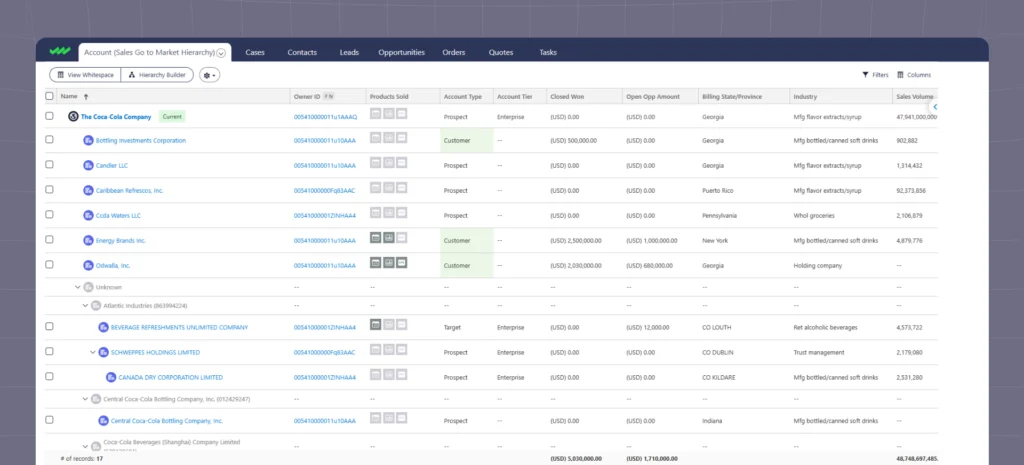
Connecting account hierarchies in Salesforce means populating lookups, and Valdes is specific about which ones. Each account links to its parent account, and each account links to its global ultimate parent.
Those lookups make your account hierarchy data actionable and reportable. Until they exist, a subsidiary sits in its own row, unconnected to the parent it belongs to.
Your checklist:
- Build account hierarchies with custom views, such as region, product line or partner model.
- Link accounts to their global ultimate parent automatically.
- Re-run the match whenever an account is created, merged or acquired.
When asked how Snap goes to market, and why hierarchies are especially pertinent here, Pickering had this to say:
With Snapchat, anyone can really be an advertiser.
Chris Pickering, Manager of Sales Operations at Snap Inc.
You could start from your most complex layer, the Coca-Colas of the world and all the subsidiaries that fall within that.
Or it could be a local small-business restaurant with four or five locations across the city, or it could be a dog walker who’s trying to just make a few extra dollars.
So being able to actually define your account structure and know your customer was a huge, [and] continues to be a huge challenge for us because it’s always changing.
Pickering described defining that account structure as a continuing challenge, because it’s always changing. So defining the hierarchy means deciding what each advertiser actually is.
Using Pickering’s dog walker example, is the advertiser Wag, the national dog-walking company placing the ad, or a local dog walker doing contract work?
Getting the correct read on the account hierarchy is imperative here, because it decides what GTM motion the account gets.
The hierarchy visual is the world your sales rep sees, where they identify one account and all the different facets of your customer. For your AI agents, the connected data in Salesforce is their visual.
Connect your account hierarchies and the relationships become reportable, and an agent can follow them from a subsidiary up to the global ultimate parent to see and understand the customer the same way a human sales rep does.
3. Match leads to related records and route them by confidence
Most B2B matching leans on an identifier like a tax ID or a Dun & Bradstreet number. But what if your customers don’t have one?
This is the case for Snap, whose advertisers are not always registered businesses, and those identifiers are often missing.
Snap started lead-to-account matching from the key fields they knew they could match, the ones Pickering called hard to mess up: name, email, address and phone number.
For the fields that came back partial, Snap added an AI layer over the matching rules to handle the probabilistic cases.
Now you can add this AI layer for that kind of probabilistic opportunity… perhaps we got a match on the address, but the floor number was incorrect. Or the zip code was missing.
Chris Pickering, Manager of Sales Operations at Snap Inc.
How do we actually go and do that?
And that’s where we can use AI to actually go do a search, put it together, and assign some sort of confidence score.
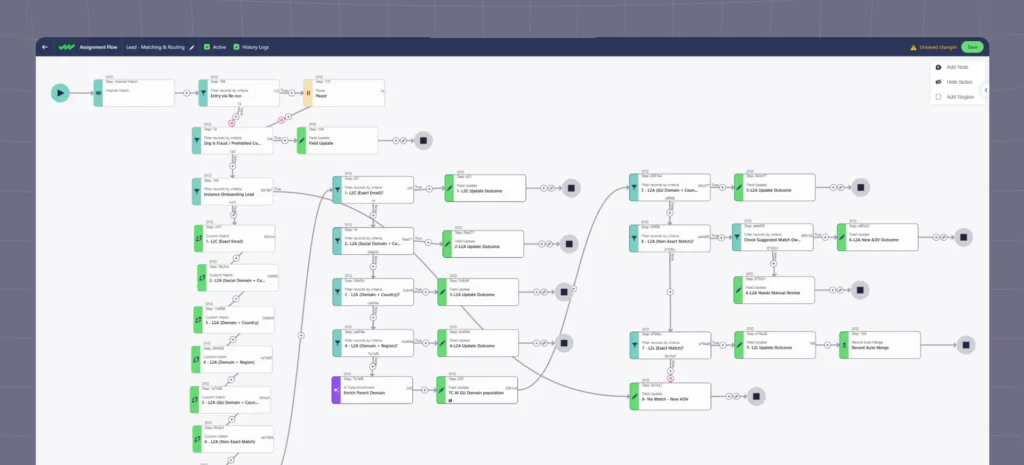
To match leads the way Snap does:
- Match key fields such as name, email and phone for your matching rules
- Set multiple criteria and add a Data Agent flow step to fill the gaps and resolve cases rules cannot
- Prioritize the right leads to the right reps at the right time
Pickering described the above image as real flow Snap has built out in Traction Complete.
That confidence score decides where the record goes. A match resolving to the national dog-walking chain routes to Snap’s largest sales team, and that same representative does not spend time contacting the local dog walker, an advertiser Pickering called very low-spend but very important to Snap.
4. Deduplicate records
Duplicates muddy information for agents the same way they do for reporting, and every Salesforce org has them.
He used a support call to make the example concrete: an agent answers, recognizes you, and pulls up your order and shipping details.
But that only works if there aren’t ten duplicates of one contact in the system. With ten, the agent has to land on the one your order is actually linked to.
To dedupe properly, Valdes recommends running rules at different confidence levels:
- High-confidence rules. These run in real time, detecting the records you are confident should merge and merging them right away to keep the data clean.
Examples include an exact email match on two leads, as do two accounts sharing a name and a website domain, or a lead and a contact with the same email and phone number. - Lower-confidence rules. These flag records for later review, with a scheduled cadence working that queue and a human approving each merge.
Two accounts with the same name in different countries fit here, as does a contact whose first name is abbreviated on one record and spelled out on another, or a fuzzy name match with no shared email or domain.
The scheduled pass exists because of how Salesforce behaves. Duplicate rules run when a record is created, cloned or edited, and on edit only when the edited field sits in the matching rule.
And the cadence matters as much as the rules themselves.
Valdes compared real-time high-confidence merges to proactively brushing your teeth, and the scheduled review of low-confidence flags to reactively going to the dentist.
The more you do the first, the less you need the second.
So when you’re kicking off your Salesforce data cleansing, split the work between proactive and reactive processes:
Proactive:
- Dedupe leads, contacts and accounts on creation
- Cascade rules from strict, for high-confidence matches, to broad, for low-confidence matches that may need manual review
Reactive:
- Plan a monthly or quarterly cadence for mass deduplication
- Customize survivorship and field retention rules in bulk
5. Normalize, standardize, validate
Valdes introduced this one as the requirement that helps with all three before it.
Hierarchy matching, lead-to-account matching and duplicate detection all improve when the values they compare are standardized, validated and normalized, and so do the roll-ups in your reports.
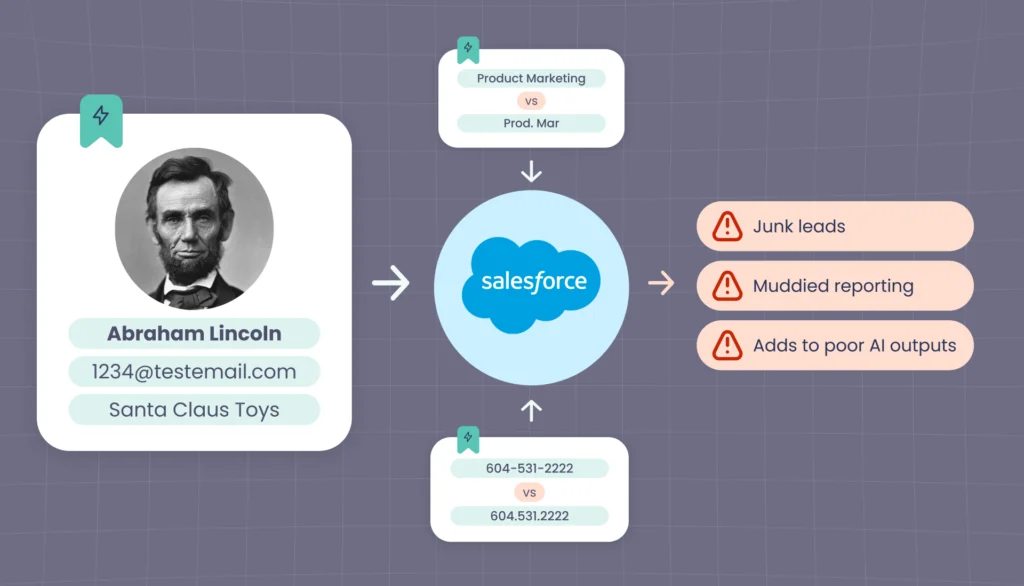
A phone number written with dashes does not match the same number written with dots. “Product Marketing” does not match “Prod. Mar”.
Here’s the best place to start:
- Standardize field formats.
- Validate fake or implausible names, companies and domains.
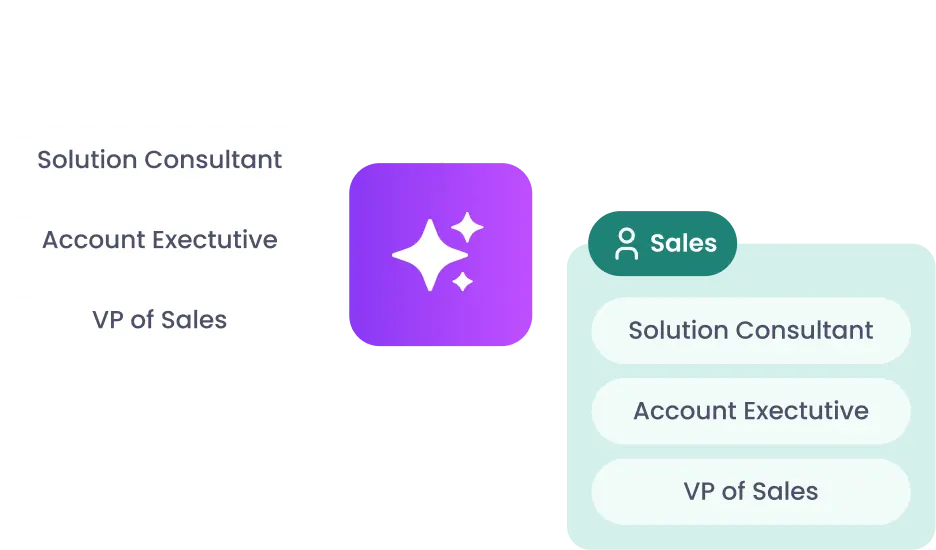
- Normalize job titles into roles and personas.
- Create anomaly alerts into Slack or Teams when erroneous values are created.
Standardizing your data helps your AI. And it runs the other way too, because today you can use AI to help normalize and validate the data it’d eventually run off.
The junk lead in this exploratory case is:
- Abraham Lincoln
- With a test email domain
- Working at Santa Claus Toys
- And just downloaded your whitepaper
You can catch some of these fake leads with regex, but Valdes argues this gets complicated quickly, particularly across languages.
A pattern only knows the fakes you have already listed.
Abraham Lincoln, Tom Cruise and Testie McTesterson each need their own entry, every new test domain needs adding, and a company name like Santa Claus Toys passes any format check because it’s a well-formed string.
You need to repeat those entries per language, so your regex ruleset will quickly outgrow the problem.
But an LLM can read the whole record for plausibility, checking whether a company by that name exists, whether the domain belongs to it, whether a person with that name and title could work there, and whether the fields agree with each other.
A president’s name, a test domain and a toy company run by Santa Claus each fail one of those checks on their own, and together they are an easy call, in the language the form was filled in or any other.
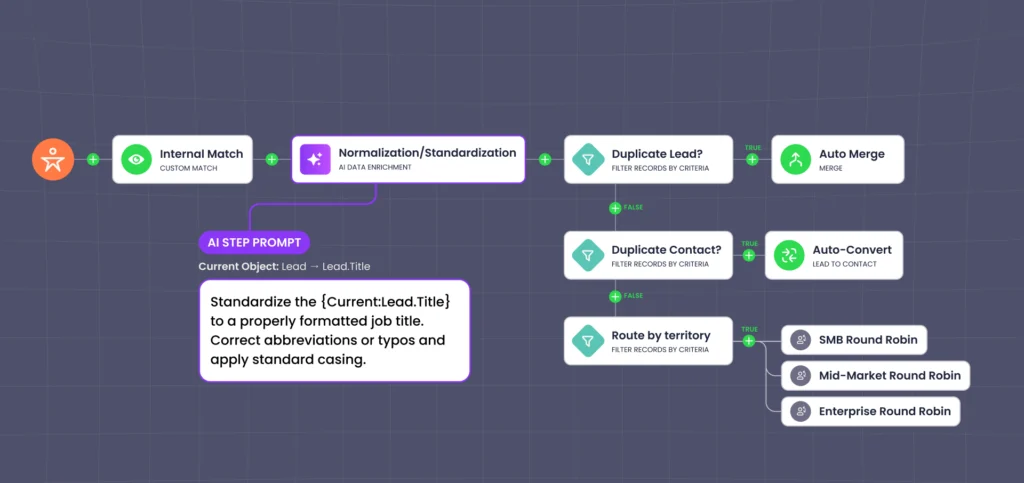
The session showed the step itself (image above). In the flow, there’s a Data Agent node between the internal match and the duplicate checks, and its prompt is written out:
| Standardize the {Current:Lead.Title} to a properly formatted job title. Correct abbreviations or typos and apply standard casing. |
Valdes recommends pushing this preliminary check closer to the front of your pipeline, as a watchdog step in the flow before records travel further.
6. Enrich through a waterfall, then score the result
Which provider you trust depends on which field you are filling.
Historically, D&B leads on firmographics and ZoomInfo on contact data. But for niche verticals and hierarchy data, AI is quickly coming out on top.
| Field type | D&B | ZoomInfo | AI |
|---|---|---|---|
| Firmographics | Primary | Fills gaps | Backstop |
| Contact data | Fills gaps | Primary | Backstop |
| Niche verticals | Backstop | Fills gaps | Primary |
| Hierarchy data | Traditional legal data | Not available | Primary (legal and custom) |
Snap is working through an end-to-end enrichment process, both at the point a lead enters and as sales teams enrich through the year.
Pickering described the stages:
- Start from the deterministic values they already hold, such as firmographics, names, addresses and emails
- Pass what remains to a layer of data aggregators, which surface name variants
Pickering’s example was his own record, a Chris Pickering against a Christopher Pickering - Send what the aggregators cannot resolve to the enrichment Data Agent
In the past, Pickering said, teams spent a painstaking amount of time cleaning and reviewing that data by hand, repeatable work those people could spend on more valuable things.
Through the Data Agent, Snap now assigns a confidence score.
It’s very important in this process to make sure the confidence score isn’t just made up.
Chris Pickering, Manager of Sales Operations at Snap Inc.
It’s not just a prompt you give of, like, hey, if this feels good, rock with it. It’s a little bit more of a formula here.
The formula weights which fields came back correct, then weights the source they came from. For example, a ZoomInfo or LinkedIn Sales Navigator result carries more pull than a simple web search.
That enrichment score then decides which seller receives the record and when. Low-confidence accounts and contacts come out of the system altogether, for revision if they return.
7. Orchestrate token efficiency
Every record pushed through a model has a price. Gartner expects AI inference costs per agentic workflow to increase more than fivefold through 2028.
Pickering described the industry-wide version of this lesson arriving by invoice.
There was a period, I would say a year ago, where what is very clearly a deterministic flow became, let’s put it in AI and roll with it.
Chris Pickering, Manager of Sales Operations at Snap Inc.
And what you end up doing, what we’ve found in that, is that bill comes and those token costs skyrocket.
Pickering’s takeaway? Use AI only where the task needs judgement. And Valdes’ has one simple test for whether a task warrants involving AI at all: does it require meaning, context, or judgement?
If it does, use AI. If it’s programmatic, use a program, or the deterministic tooling you already have. Things like Flow elements, matching rules, validation rules, and formula fields, and other traditional flow features.
Reformatting a phone number, checking that a required field is filled, or matching two leads on an exact email is programmatic and needs no model.
Correcting “Prod. Mar” to “Product Marketing” requires judgment about what the abbreviation meant. Deciding whether an address match with the wrong floor number is the same company — Snap’s case that Pickering highlighted in the Dreamforce session — requires the same judgment.
Snap’s fix was to identify which tools and projects genuinely need AI, and the ones a traditional flow handles better.
Without that sorting, Pickering said, the token bill either hits you financially or impacts your ability to build an AI system that’s worth those tokens.
In Snap’s case, a lead matched on address but the floor number was wrong, so Pickering hands that record to a Data Agent. The agent searches, assembles what it finds, and writes a confidence score, described in step 6, to the lead.
To create a token-efficiency strategy in your own org, follow these best practices:
- Route high-volume, low-risk work to the simplest capable method. Exact matches, format fixes and required-field checks run as Flow logic or rules. A model only sees the records those cannot resolve.
- Add escalation logic instead of forcing every task through the most powerful model. Start each AI step on the cheapest model that can do the job, and escalate only the cases it fails or scores low on.
- Use deterministic validation. Schemas, required fields and confidence thresholds validate the record before and after the AI step. Those checks are rules, so they add no token cost.
8. Govern how teams use AI
Governance, in Valdes’ framing, is how you guide people’s behavior with AI in your enterprise. And the pressure comes from AI sprawl.
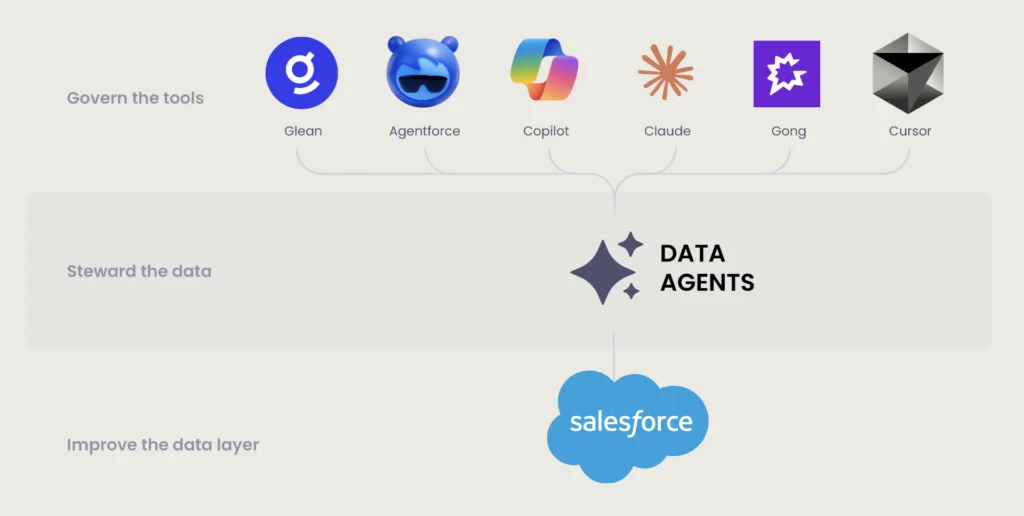
These days, every product ships its own AI. And your team likely already has Cursor, Claude and other AI tooling on top.
In this world where we have Glean, we have Claude, we have Cursor, all of these different tools, realistically we’re not in a position where everyone needs to use all of those tools.
Chris Pickering, Manager of Sales Operations at Snap Inc.
So let’s identify what is the right tool.
Understand what it will integrate with, and what MCPs we have available in those tools.
Recognizing the bloat, Snap scaled back, and matched the AI tooling to teams by purpose.
In the session, Pickering contrasted Snap’s AI tool governance against what most teams have right now, where every employee can create an AI agent and the questions of who maintains it, who scales it and who measures its success go unanswered.
For every AI process already running in your org, ask:
- What does the process do, and which tool and flow does it live in?
- Who manages it, by name?
- Who has ongoing visibility into what it writes?
- Who is gated out of it, and what breaks downstream if they are not?
- Which group decides when two of those answers conflict?
- Do you have a data dictionary?
- Do you have rules and policies in place?
Answering these questions per process is the ring-fencing Pickering described, and his expectation is that productivity rises as a result.
9. Make agents earn your trust
Where governance sets the rules for people, Salesforce data stewardship covers your GTM data and the agents working within and on it.
Stewardship, think of it as a process by which you make sure your agents earn your trust. And you want to start that process by having no trust in your agent, and by having your agent make decisions and then tell you the why of those decisions.
Ernesto Valdes, CTO at Traction Complete
What were the data sources, as Chris said, that were used in that decision? What was the rationale that the agent used with that data to make the decision?
What is the confidence level, not a vibe, but a formula that you can understand.
To make an agent earn enough of your trust to eventually act autonomously, Valdes recommends:
- Setting confidence scores with a threshold for human-in-the-loop review, for example above 75%
- Requiring every change to carry evidence through source citations and a reasoning narrative
- Maintaining an audit trail and a feedback loop
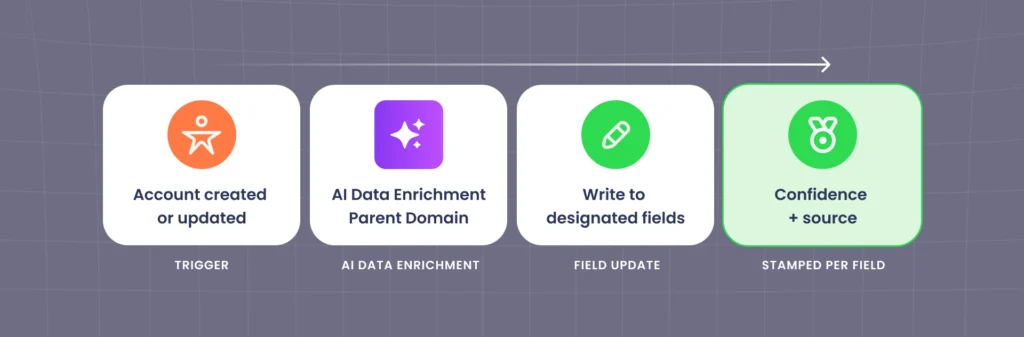
In the session’s enrichment flow, a Data Agent fills the parent domain on account creation or update, writes it to the fields you designate, and stamps a confidence score and source on each field.
This workflow helps you assess whether the agent is doing well and why, give it feedback, then iterate and improve.
As you work through this process and see the agent improve, you can eventually step back to manually reviewing only the lower-confidence actions your agents have taken.
10. Define success metrics
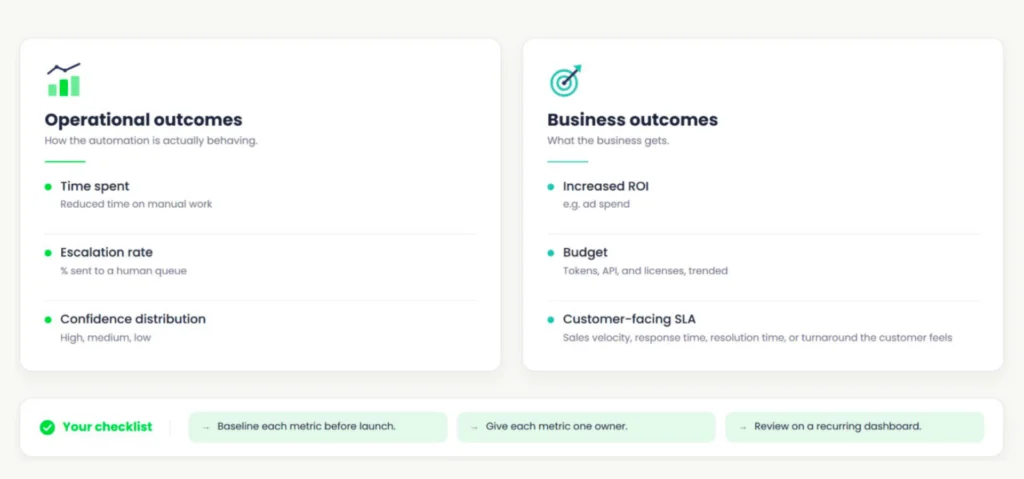
Valdes introduced success metrics as probably the most important requirement in the session, then put it to Pickering, who said:
At Snap, I think we really think of it in two primary categories.
Chris Pickering, Manager of Sales Operations at Snap Inc.
We have our operational outcomes and we have our business outcomes. And ultimately those two should tie together, but I think they also stand on their own respectively.
Operational outcomes, or how the automation behaves:
- Time spent on manual work
- Escalation rate, as the share sent to a human queue
- Confidence distribution across high, medium and low
Business outcomes:
- Return on investment
- Budget across tokens, API and licenses, trended over time
- Customer-facing service level agreements (SLAs) such as sales velocity, response time and resolution time
Whichever metrics you choose, baseline them before launch and give each one an owner. Then review them together on a recurring dashboard, with token, API and license spend trended on one side, and time returned to selling, escalation rate and ad revenue on the other.
Pickering’s operational example was Snap’s data enrichment and lead routing.
Both used to rely on manual review: searching through databases, going to the web, and making decisions that varied from human to human.
The time reclaimed from that now goes to selling and engaging advertisers. The second operational metric is escalation rate.
We have a large volume of what we would call cases, essentially, where someone didn’t know what to do: hey, send it to the next round. And basically we would repeat those steps. And so we’re working to really lower those.
Chris Pickering, Manager of Sales Operations at Snap Inc.
On the business side, Pickering pointed to ROI:
What we’re seeing is we’ve lowered our OpEx and, as a result, that our ads business is growing, by getting these enriched contacts connected to the right accounts and sent to the sales teams as quickly as possible with the information they need.
Chris Pickering, Manager of Sales Operations at Snap Inc.
Valdes closed the requirement by collapsing Pickering’s two columns into one question.
The cost side is tokens, API calls, licenses and the human time the automation still needs. The return side is the growth of the ads business.
On the one hand, you’re tracking your token spend, your investment, and on the other hand you’re tracking your return on that investment.
Ernesto Valdes, CTO at Traction Complete
How Much of Your Data is Still Crude?
Crude describes your data when it lands, before a rule or a person has structured, deduplicated or verified it.
Valdes and Pickering’s session examples are all crude records. Prod. Mar in a title field, a phone number written with dots on one record and dashes on another, or an advertiser that could be Wag or a local dog walker.
A human might fix those mistakes when they come across them. But an agent reads the record as it is, and to an agent, Valdes said, the data you give it is reality.
But your data was never “bad,” just unrefined and crude.
Snap’s dog walker was an advertiser worth routing correctly when the lead arrived. Pointed at that record as it landed, an agent takes what Valdes called wrong actions at scale, with the record looking right the whole time.
Refine the data first and the agent delivers what Pickering reported: enriched contacts reaching the right accounts and sellers faster, with revenue growing in tandem.
Watch Ernesto Valdes and Chris Pickering walk through all ten requirements AI data quality requirements in the full Dreamforce 2026 session.

Get the Twelve Plays Behind the Data Quality Requirements for AI
The data quality requirements for AI describe sets out what agents need before they act.
Crude to Revenue: 12 Agentic Data Plays for RevOps shows how to clean, refine, and orchestrate that data inside Salesforce.
What’s inside:
- The four stages GTM data moves through between entry and revenue-ready
- 12 plays, each tied to a specific Salesforce object, field, or process
- How RevOps teams at Fivetran, GitHub and Inchcape run agentic data workflows in Salesforce
- Which plays to run first when your hierarchy and matching data are still unreliable
- A low-risk way to test agentic workflows with real records and no write-back