
Your Salesforce data layer is the set of records every other system reads before it acts: accounts, contacts, hierarchies, territories, enrichment fields, and routing logic.
And for most of the last decade, the data layer sat idle in the background.
Reports ran, dashboards pulled , and routing fired off it. Nobody kept the data layer trustworthy in any continuous way, until AI moved it to the forefront.
Now, every agent, copilot, dashboard, and routing rule acts on whatever that data layer says is true, at machine speed, without a human reading the number first.
So when that data layer is wrong, everything built on it is confidently wrong too, faster and across more teams than before.
This is how to rebuild trust in the Salesforce data layer.
What’s the Salesforce Data Layer?
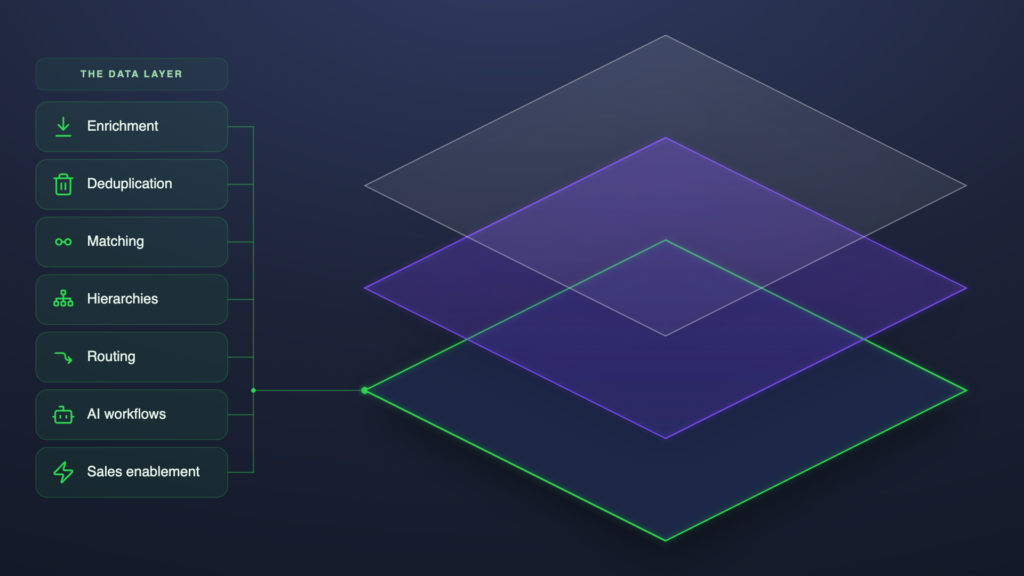
The Salesforce data layer is the data you build your go-to-market on top of. The accounts, contacts, account hierarchies, territories, enrichment fields, and routing logic inside your Salesforce org that everything reads from.
In a typical revenue stack, the Salesforce data layer includes:
- Account records, contact records, and the relationships between them
- Opportunity records and the deals they represent
- Account hierarchies (parent, child, sibling, ultimate)
- The buying committee on a deal (contact roles, stakeholders, and their relationships)
- The state of your lead-to-account matching
- Territory definitions
- Enrichment fields populated by data providers
- Deduplication state (what is merged, what is queued, what is unresolved)
Why the Salesforce Data Layer Matters More Than Ever: 3 Reasons
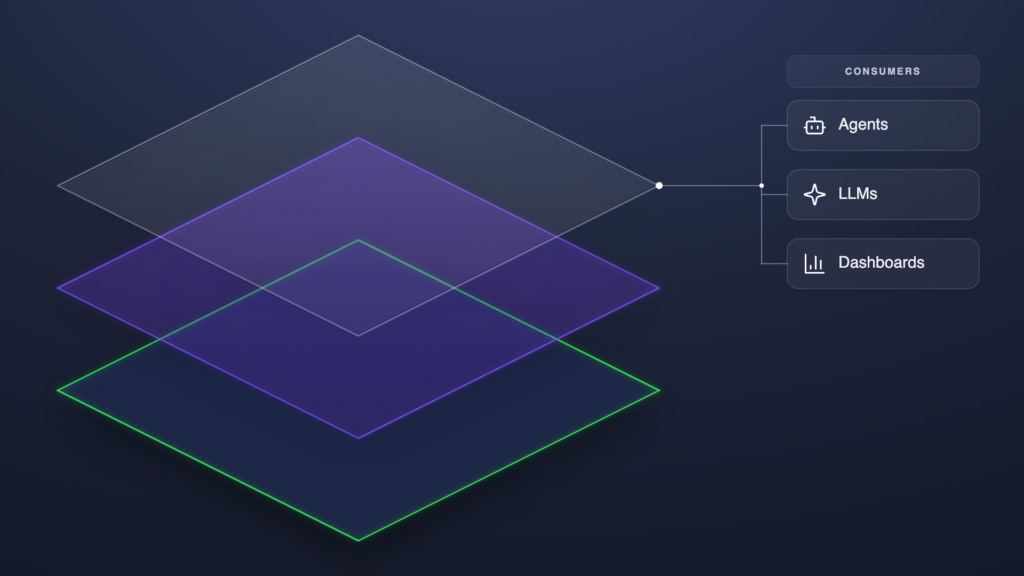
The data layer was always the foundation. What changed is what now sits on top of it.
A dashboard reads the data layer and shows you a number, and a human applies judgment before acting on it. An AI agent skips that step. It reads the layer, decides what’s true about an account, acts on that answer at machine speed, then hands the result to the next agent, dashboard, and sales rep downstream.
But no agent is smarter than the data.
Feed it a stale account and it will act on said stale account. When a new lead enters Salesforce, the data layer answers one question for every downstream system: what is true about this account?
A better AI model doesn’t make that answer any “better.” The data layer underneath it does, and three reasons have changed around it:
1. Your data layer is the only part of your AI stack a competitor cannot buy
Every company can license identical models and identical data providers, and each release narrows the gap between them.
Before AI, an edge in Salesforce came from how well a team used its tools. Now the tools reason on their own, and their output is only as different as the data they read.
A provider file is identical for each buyer, and it records the public shape of a company:
- Legal name and registered address
- Headcount band and an industry code
- The corporate family it can verify from filings
It also runs out where the public record does, at EMEA subsidiaries, small businesses below the reporting threshold, and divisions that operate on a structure different from their legal ownership. What a provider knows, your competitors know. And what it leaves out, you fill yourself.
The rest of the account record exists in your org alone:
- Which subsidiary buys through which parent
- Who sat on the buying committee at the last renewal
- What the last three opportunities closed at, and why
- Which territory a rep works
- Which of two provider values your team decided was right
Those facts are recorded in Salesforce and absent from any provider file, and they are the ones an agents needs to answer the question above: what is true about this account.
Two companies on one model with one provider set get an identical answer about a company’s headcount and different answers about whether it is a customer, who owns it, and what it is likely to buy next.
The difference is the layer. That makes your data layer the one asset in the AI stack a competitor cannot license, and the one whose accuracy decides how much of the model’s output you can act on.
2. The data layer is shared, so dirty data compounds
Until recently, a report or a dashboard read the data layer and a person read the report. Routing rules and territory assignment ran off it too, but each result went through human review before going live.
Now, agents read the Salesforce data layer directly and act on it in the same breath. And the number of Agents per record has gone up in tandem with teams scaling and operationalizing AI.
Chris Pickering, Manager of Sales Operations at Snap, set the goal that all enterprises should achieve when he joined Ernesto Valdes, CTO at Traction Complete, for a session data quality requirements for AI: prepare for agents to act on your data at machine speed.
Because one field feeds several processes, the knock-on effects of even a single wrong value can be astronomical.
Natively, Salesforce also gives inconsistent data room to stay:
- Duplicate rules evaluate a record when a user creates or edits it and do not re-check records already in the org
- The native merge wizard combines three records at a time, max
- Account names arrive in several formats, phone numbers in regional layouts, and industry codes disagree depending on which sync ran last
Salesforce’s 2026 State of Sales report, a double-anonymous survey of 4,050 sales professionals, found 74% of them spending time on data cleansing. And when we asked RevOps teams why their data layer fails, nearly eight in ten named duplicates or a contested source of truth.
With more systems and agents reading records than ever each of those failures now reaches further than it did when a person read the report first.
3. AI without governance isn’t trustworthy
A decade ago, a field changed when someone edited it or an admin ran an import, and both could confidently say what they changed. Now, enrichment syncs, integration updates and automated jobs write to records at a rate beyond manual review. Worse still, a correct write and an incorrect one look identical on the record.
Ernesto Valdes, our CTO, described what that means for an agent reading the result:
All of your agents, whether it’s Agentforce or Claude, to them the data that you give them is reality.
Ernesto Valdes, CTO at Traction Complete
So this data that you have in your CRM or in Data 360, if it doesn’t match the actual state of your customer and the reality, then your agents are gonna be taking wrong actions at scale.
And whether you can accurately determine what’s correct or not depends on what Salesforce logged:
- Salesforce’s Field History Tracking covers 20 fields per object, or 60 with the Field Audit Trail add-on, and keeps that history for 18 months
- Setup Audit Trail logs configuration changes for 180 days and does not record field values
- A field outside those limits changes with the previous value unrecorded
Reversing a change has its own limits:
- A merge cannot be undone. The losing records go to the Recycle Bin for 15 days, and restoring them does not restore the merge
- A mass update through Data Loader overwrites the old value in place, and the way back is a backup export taken before the job ran
The Salesforce data layer used to change at a pace that still allowed for human review. Automated (or agentic) writes now outpace that rate exponentially. And Salesforce keeps a full record of only some of them.
Watch Ernesto Valdes and Chris Pickering walk through all ten requirements AI data quality requirements in the full Dreamforce 2026 session.
3 Ways to Rebuild Trust in the Salesforce Data Layer
Most CRMs, Salesforce included, run as a system of record. Like a paper map, the data is right the day it’s printed and wrong the day a road moves.
If you’re not fixing the data, whatever you’re doing in Salesforce is going to be fundamentally flawed.
Adam Brewell, Director of Solutions Consulting at Traction Complete
The silver lining? Once the data is trustworthy enough to act on, the CRM becomes a system of direction: a live GPS that tells the revenue engine where to go next, using real-time data about the accounts, relationships, and the signals around it.
As AI absorbs the maintenance work, a strategic role steps in to design the rules underneath it: the Revenue Architect.
Where a GTM Engineer builds the workflows that turn signals into pipeline, the Revenue Architect designs the validation, precedence, and routing logic that decides whether those workflows act on something true. One executes; the other designs the instruction set every execution runs on.
The instruction set is what you rebuild that trust with; it comes together in three steps.
1. Architect your go-to-market rules
When something breaks downstream, the cause is rarely where the symptom shows up.
The answer is almost always two or three layers below.
Darell Alfonso, Marketing Operations Leader, on what fails when AI runs on a broken data layer
Start by auditing your current rules and process, and recording them in a centralized place.
Most RevOps teams have them living in spreadsheets, inside the heads of practitioners, or in flows that nobody can remember why the logic is set.
- Hierarchy logic is the difference between who legally owns an account and who actually sells into it.
Take a multinational like Disney: dozens of subsidiaries, divisions, and legal entities under one parent. A lead from Hulu or ESPN should route to whoever owns the Disney parent account, not whoever’s next in the round robin.
Without that logic written into the data layer, the lead lands with the wrong rep, leading to ownership conflicts, commission splits, and a poor customer experience.
- Enrichment precedence decides which data provider wins when two disagree on the same field and what happens when both come up empty.
A fintech company like Stripe might be tagged “financial services,” “payments,” and “data processing” by three different data providers. Each classification is partially right, but only one can drive your segmentation, routing, and reporting.
This is the Architect’s call to make, not the individual builder’s, because only the Architect sees the whole downstream stack and can keep precedence consistent as new tools get added. Without it written down, the same account lands in a different segment depending on which sync ran last. - Deduplication rules define what counts as a match and which record survives the merge.
Your Salesforce org could have a company like AT&T entered as AT&T Inc., AT&T Corp, AT&T Mobility, ATT, and AT and T. One legal entity, five different records.
Pick the survivor, decide which fields merge in, and apply it consistently. Skip this and you lose activity history, re-parent opportunities by accident, and watch the same five variants reappear two months later. - Routing logic decides what reads from territory, what reads from hierarchy, and what happens when a lead is net new with no existing relationships in Salesforce.
A new contact at a small subsidiary of a Fortune 500 company: lead-to-account matching catches the tie to the parent, the hierarchy rule says the parent belongs to an enterprise Account Executive (AE), the territory rule says the subsidiary’s region belongs to a small-and-medium-business (SMB) rep.
Without structured routing logic, the lead routes inconsistently. The AE never knows they got it, the SMB rep never knows they lost it, and the customer gets a cold pitch from someone with no idea what their parent company already buys.
Order is part of the logic, not the afterthought. Enrich first, then match, resolve the hierarchy, validate, then assign.
Run those steps out of order and you get the wrong answer no matter how good each individual tool is: a lead matched before enrichment resolves to the wrong account, or a hierarchy resolved on un-deduped accounts will inherit every duplicate.
The Revenue Architect owns this Salesforce data stewardship layer. You’ll catch more gaps writing down these rules halfway than you ever found leaving them in people’s heads.
2. Deploy data agents to steward the data layer
Most agents consume the data layer; a Data Agent writes back and improves it.
A Data Agent is an AI agent purpose-built for the Salesforce data layer. It runs natively in the org and ships every output with a confidence score, a source citation, and a human approval gate. It scouts before it suggests, pulling from the open web, public filings, news, and other sources to augment what your existing data providers already cover.
All of them work on the layer that traditional agents, large language models (LLMs), and dashboards consume, organized around three major actions: cleanse, connect, and orchestrate.
Cleanse: Fill the gaps, standardize, and validate the records that already exist
- Normalize. Cleans account names, phones, addresses, and industry values into standardized fields, batched 50 to 100 records per call.
- Validate. Cross-references existing provider matches against live web data and flags outdated, ambiguous, or unactionable ones.
- Operationalize. Classifies accounts by entity type, industry, or any custom taxonomy, including sovereign entity detection and public-sector flags.
Connect: Link related accounts into working relationships your team can actually act on.
- Account hierarchies. Turns the account hierarchy data your providers sell into a structure Salesforce can actually route and report on. It finds the global ultimate parent for orphaned accounts when traditional providers can’t, pulls evidence from the open web, and writes the link back to Salesforce with a confidence score and source URLs.
Orchestrate: Keep the data layer current as the business changes underneath
- Refresh. Monitors news, SEC filings, and the open web for M&A activity, name changes, and corporate restructures, flagging accounts where reality has diverged from Salesforce
Use Refresh to catch M&A drift that data providers reflect months or years late (a gap that RevOps teams typically need to solve manually).
Pro Tip: Test new enrichment before it touches Salesforce
Before any enrichment prompt updates a record in production, prototype it in Complete Discover. The solution brings AI enrichment into Google Sheets, where teams can test prompts on real account data, validate, and decide what’s worth scaling.
READ: Safe Salesforce AI Data Enrichment: How Complete Discover Makes it Possible
3. Govern the loop
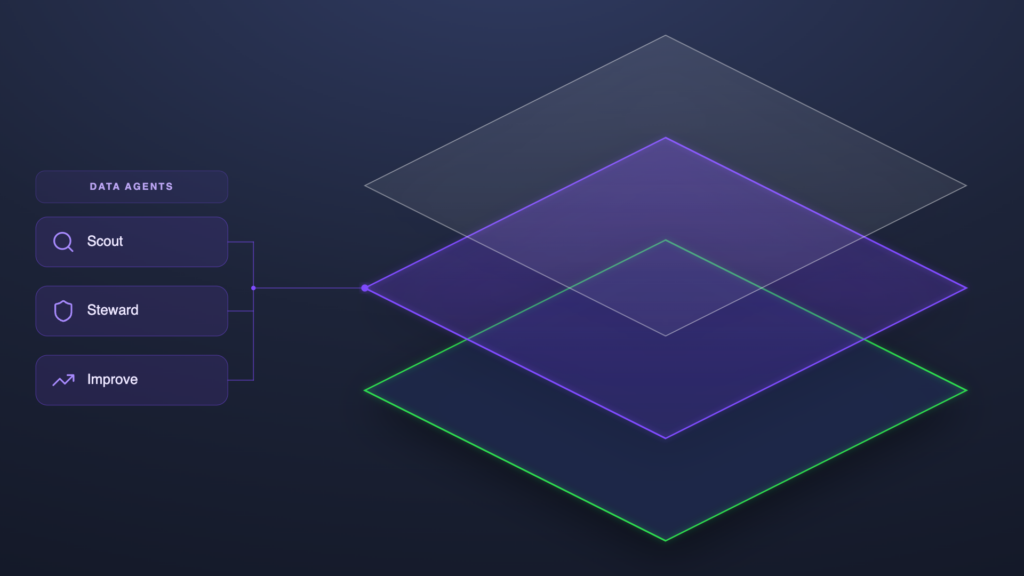
Two more core elements keep Data Agents trustworthy in production.
- Approval gate. Every AI recommendation can be governed based on your level of trust and risk tolerance. Review and approve high-impact suggestions when needed, or automate execution for proven workflows where accuracy is already established.
- Continuous improvement. Every data agent ships with a confidence score, a reasoning narrative, and source citations. In the future, the system will learn from every approval and refusal, helping confidence thresholds improve as that Data Agent sees more of your business.
These form two of the ten data quality requirements for AI, and are foundational for rebuilding trust in your Data Layer.
Who’s Fixing Your Salesforce Data Layer?
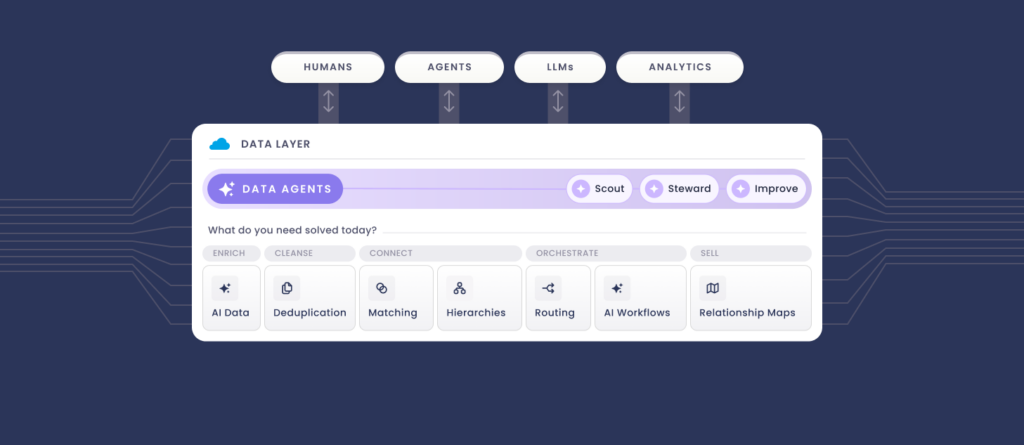
Each of the three steps above has a matching capability in Traction Complete’s suite. Data Agents normalize names and addresses, validate records against live web data, find the global ultimate parent for orphaned accounts, and watch the open web for the mergers and name changes that put hierarchies out of date.
The governance is built in. Every change an agent proposes carries a confidence score, its reasoning, and source citations, and waits at an approval gate until a human clears it. The audit log keeps the trail, and each approval or refusal trains the agents on your org’s definitions.
None of this requires rebuilding your org.
Data Agents read and write the objects you already have: Accounts, Leads, Contacts, and the custom fields your routing relies on.
Start where your reporting depends on structure: account hierarchies and the routing fields that read them. Book a demo to see the agents work.

See How Three Revenue Teams Fixed Their Salesforce Data Layer
See how Fivetran’s Senior Director of Global Revenue Operations, GitHub’s Senior Director of Marketing Operations, and Inchcape’s Head of Data as they explain how they fixed their Salesforce data layers.
Discover how they consolidated Salesforce through M&A, kept master data accurate under outside scrutiny, and held a source of truth at the front of the funnel, plus the five plays every Revenue Architect came back to.