Scaling rewards speed, but winning enterprise customers requires context. Traditional lead routing prioritizes the former at the expense of the latter.
Classic lead routing relies on clean, linear rules: geography, employee count, or industry.
But modern enterprise (ENT) accounts are rarely clean or linear. They’re messy, sprawling webs of parent companies, subsidiaries, and acquisitions.
And as your customer base grows, these layered relationships start to dictate your GTM. A lead coming in from a subsidiary isn’t just a net-new lead; it’s also a signal within a wider account strategy.
If your routing ignores the corporate family tree, the most well-enriched leads still behave like islands. And the cross-sell, up-sell, and expansion signals never surface.
That’s when adding hierarchy-based lead routing to your toolkit unlocks your enterprise pipeline’s full value.
What is Hierarchy-based Lead Routing? (And Why it Matters More Than Ever)
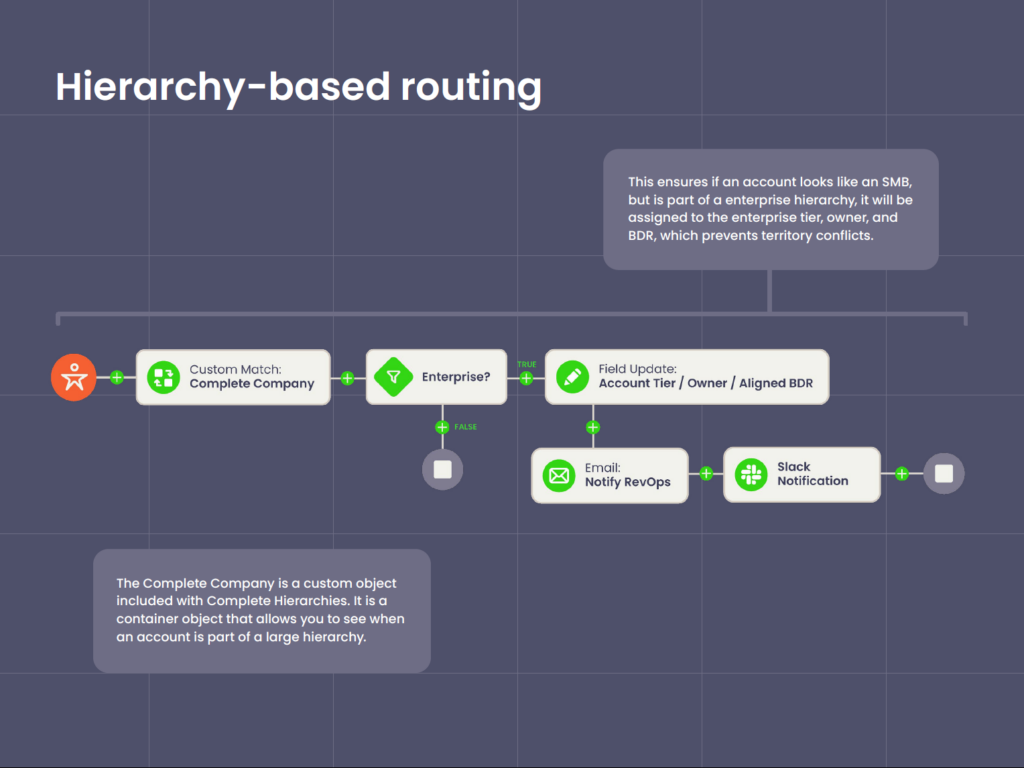
Hierarchy-based lead routing is a routing strategy that assigns leads based on their relationship to a wider corporate family tree or account hierarchy.
Instead of relying on isolated data on the lead record itself, hierarchy-based leverages the full family tree — composed of related child accounts or subsidiaries within a parent account — and assigns ownership based on that wider corporate context.
This contrasts against a traditional routing setup, where logic relies on linear, flat fields. If a lead comes in with the country listed as “France,” it’d go to the French sales team.
Hierarchy-based routing introduces a vertical layer of logic.
Before assigning the lead, the system looks up:
- Does this lead belong to an account that is part of a larger corporate hierarchy?
- Is there a parent company or a “Global Ultimate” (GU) already in our system?
- Does an account owner already exist at that higher level?
If the answer to any of these questions is yes, the system bypasses standard geo- or round-robin rules and routes the lead directly to the account owner of the parent organization.
Why hierarchy-based routing is especially important now
As B2B sales shift toward land and expand and buying groups, the organizational structure of your prospects matters just as much as their firmographics. Here’s why:
- M&As are reshaping account landscapes. Companies are constantly acquiring and merging with others.
If you treat a lead from Slack as a net-new prospect, completely ignoring that your team is already negotiating an enterprise deal with Salesforce, you create internal conflict and look unorganized to the buyer. - Buying committees are increasing. Purchasing decisions are increasingly made by buying committees spread across subsidiaries and related business units.
Hierarchy routing ensures that all signals from a distributed buying committee roll up to a single so anyone can see the full picture right on the account record. - Buyers expect continuity across touchpoints. Can you imagine how annoying it’d be to repeat your purchase requirements to a junior SDR when you’re already a paying customer at the corporate level? Hierarchy-based routing prevents that from happening by immediately reconnecting leads with their established point of contact.
- Net Revenue Retention (NRR) pressure makes visibility crucial. In a unified account strategy, a lead from a subsidiary is a new deal and an expansion opportunity.
Hierarchy routing lets you spot upsell opportunities hiding in plain sight, allowing AEs to leverage existing Master Service Agreements (MSAs) to close subsidiary deals faster and drive higher NRR.
Why Automated Account Hierarchies Are the Key to Accurate NRR
Most NRR blind spots come from missing or incomplete hierarchies. And traditional reporting doesn’t reflect how enterprise customers actually buy, expand, or churn.
See how hierarchy-level visibility finally gives you the complete picture of revenue movement across your largest customers — and the accuracy your NRR reporting has been missing.
WATCH: The Untold NRR Story Hiding Inside Your Account Hierarchies
How Hierarchy-Based Lead Routing Works: A Step-by-Step Breakdown
Hierarchy-based lead routing starts the same way every routing process starts: with a new record entering your Salesforce environment.
The difference is that instead of treating that record in isolation, hierarchy-based routing evaluates it in the context of the entire account hierarchy and any existing coverage or opportunity strategy.
Here’s what that looks like:
1. Lead creation and initial matching
A new lead hits Salesforce from a form fill, list upload, event, or integration. Before you can decide ownership or next steps, you must connect it to the right account.
Consider a lead using the address doe.john@panamerican-retail.com.
In a database populated with lookalikes (“Pan-American Logistics” or “Pan-American Wholesale” or “Pan-American Retail”), a name search alone is unreliable.
But a hierarchy-aware automated lead-to-account matching engine (like Complete Leads) can compare the domain, name similarity, and regional context to determine the correct account record.
This step confirms who the lead belongs to, but not yet how that account fits into the broader corporate structure.
2. Understanding the account’s position in the hierarchy
Once you have a preliminary account match, the next step is understanding where that account sits within its corporate family.
Pan-American Retail rolls up to US Retail Group, which ultimately rolls up to Global Retail Corporation. That structure shapes ownership, territory coverage, opportunity context, and how your team should handle the lead.
Because Complete Hierarchies automatically manages and updates these relationships, the routing engine gains immediate clarity on whether the lead belongs to a child, a parent, or a top-level global entity. It’s this step that adds the context that traditional routing rules can’t see.
3. Applying routing logic that leverages hierarchy context
Once the routing system knows where the account sits, you can apply flow-based routing rules that leverage that hierarchy context.
With Complete Leads, you configure these rules visually, using steps like:
- If the lead matches a child of a strategic parent, send it to the strategic global owner.
- If the lead matches a net-new subsidiary under a named account, route to the account team, not general SDR round robin.
The key here is that routing decisions are no longer based only on the lead’s own fields. They respect the relationships behind the record.
So if your coverage model includes logic like “route all subsidiaries of a Strategic Global Parent to the strategic owner,” Complete Leads checks the hierarchy and sees that Pan-American Retail rolls up to Global Retail Corporation, which your org classifies as strategic.
With the hierarchy position confirmed, your routing tool can now evaluate rules that rely on parent–child relationships rather than flat lead fields.
4. Providing hierarchy visibility and context for reps
Efficient routing isn’t just about where the lead lands. It also needs to give the assignee enough context to make the best first move.
So when your ENT AE opens the lead assigned to them through hierarchy-based routing, they can immediately see how the matched account fits into the prospect’s org.
In this case, the rep sees:
- Pan-American Retail listed as the child account
- US Retail Group shown as the parent
- Global Retail Corporation displayed as the global parent
- Additional sibling divisions connected under the same parent
Complete Hierarchies surfaces this context directly on the account record, so reps don’t have to click through multiple records or do manual research to see how entities relate.
5. Final assignment to the right owner or team
With the hierarchy context and routing rules applied, the system makes the final assignment.
If your rules prioritize global ownership for strategic accounts, the lead gets assigned directly to the AE responsible for Global Retail Corporation, not the regional SDR queue that would normally receive leads from Pan-American Retail.
The assignment ends up reflecting your actual account strategy, not the limited data on the lead record itself. Complete Leads updates the Lead Owner field and places the record into the correct queue or rep’s name.
From there, the lead can follow your usual workflows: sequences, tasks, SLAs, or opportunity creation — only now with correct account alignment from the start.
5 Reasons Traditional Lead Routing Falls Short for Enterprise GTM
When you rely on linear routing rules to manage complex, multi-tiered accounts, you introduce friction that works against your account strategy. Here’s where those disconnects happen:
1. Geography can override account strategy
Geo-based routing assumes a lead’s location reflects who owns the conversation.
That reasoning works when every customer operates out of a single office, but it falls apart with global and multi-region accounts.
Imagine that:
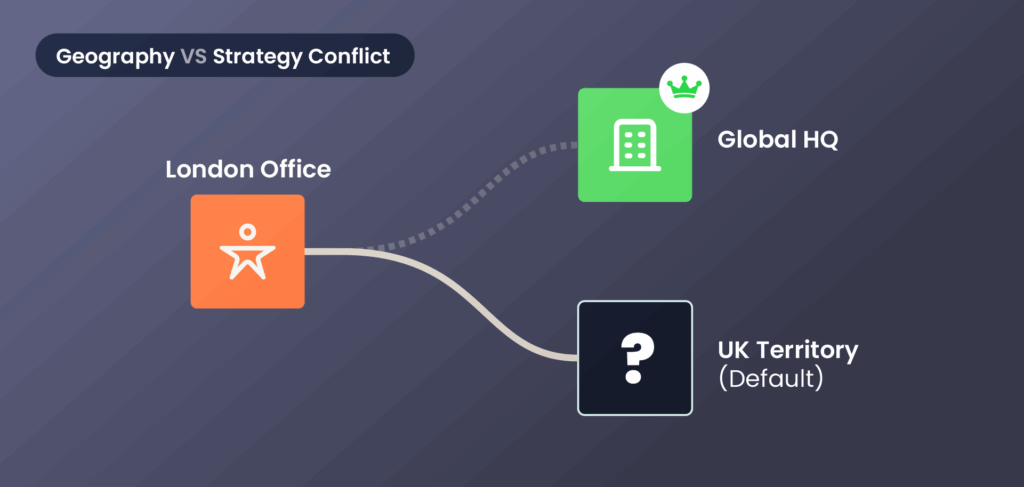
- A lead comes in from a London office.
- Your routing engine reads the country field.
- It assigns the lead to the UK territory by default.
This looks reasonable on paper, but enterprise accounts aren’t isolated islands.
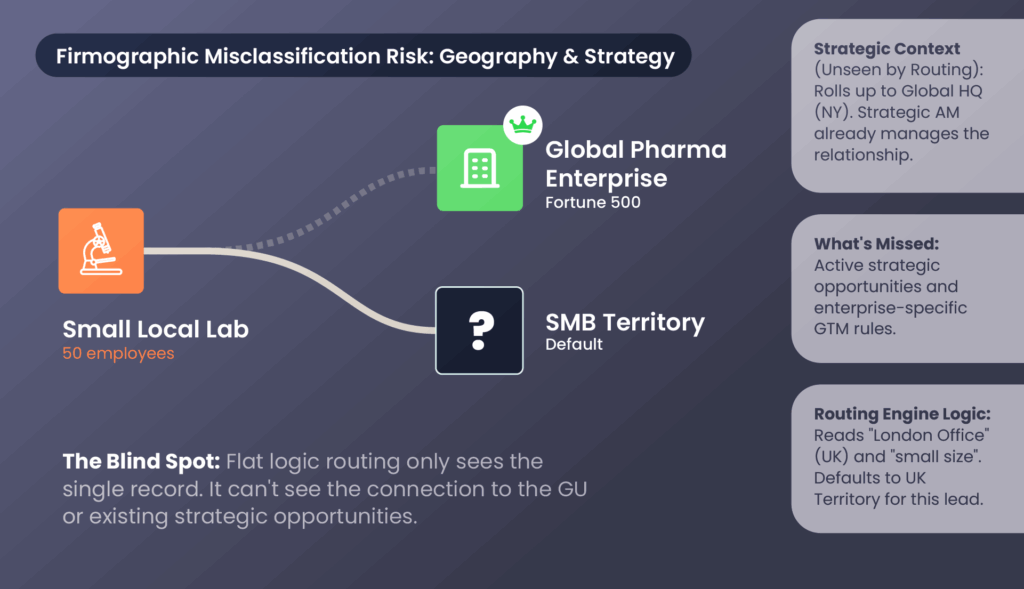
This London-based branch might roll up into a global HQ in New York, where your Strategic Account Manager (AM) already manages the full relationship.
Remember that flat logic routing only sees the location on a single record.
It can’t see:
- How the London office connects to the GU.
- Whether a strategic opportunity is already active.
- Whether your GTM rules route enterprise accounts differently.
And if your routing ignores that structure, you get:
- Parallel outreach. Your rep working the UK territory treats the lead as net-new.
- Missed context. You get no visibility into the global enterprise deal already in motion.
- A confused buyer. Two different teams end up telling two different stories.
2. Firmographic details risk misclassifying enterprise subsidiaries
Firmographic fields like employee count and revenue are great for determining segments.
And in an ideal world, this makes practical sense: a company with 50 employees is likely an SMB.
But in the enterprise world, this logic risks misclassifying leads once subsidiaries and acquisitions get involved.
Global conglomerates can have dozens, sometimes hundreds, of smaller subsidiaries, distribution hubs, and regional offices worldwide.
Let’s say a fresh lead enters and your routing engine sees this:
- Fewer than 100 employees
- Smallhead count for the local office
- A standalone, independent business unit
Those parameters scream “SMB,” so it gets routed to the SMB rep.
But what your routing engine can’t see is the enterprise structure behind these seemingly “small” records.
For example:
- A 50-person lab division that might belong to a global pharmaceutical enterprise.
- A boutique local office that’s a regional branch for a Fortune 500.
- A regional distribution division that purchases independently from its global parent.
And by the time you catch the mistake, the damage is already done.
Maybe the SMB rep reached out with a low-level pitch, completely unaware of the existing MSA or the complex procurement requirements required by the parent company.
Beyond being embarrassing for the sales team, this misstep also creates problems with territory ownership once the ENT rep discovers a junior colleague is working the same account.
We have very complex and large hierarchy structures. That made it difficult for our sales team to understand what a company structure looks like, how to approach them to create a relationship, or how to cultivate an existing one.
Heidi Davis, Manager of Sales Operations and Global Data at Zoom
3. Round robins can ignore account context
Round robin lead routing emphasizes fairness. It maximizes speed-to-lead by assigning the next inbound lead to the next available rep. It’s the gold standard for net-new prospects with no prior history.
But for enterprise hierarchies, round-robin logic is a context-blind lottery.
Because round robins treat each lead as an isolated record, it overlooks when a lead:
- Already has a customer relationship
- Is sourced from a strategic account
- Conflicts with a rep’s active deal
Imagine this scenario: one of your top ENT AEs has spent the past half year cultivating a relationship with a Global Ultimate account.
Serendipitously, a director from one of that account’s regional subsidiaries requests a demo.
The round-robin engine ignores ownership, hierarchy, and existing opportunities. It assigns the lead to a brand-new rep because they, serendipitously, happen to be next in the queue.
Externally (to the customer), this feels jarring.
They expect to speak with someone who understands their goals and account history. Instead, they have to re-explain the context to someone who has no experience with the relationship.
Internally, it gets worse:
- The ENT AE now has to reclaim the lead.
- Commissions might get split, creating friction within the team.
- The handoff slows the response time.
Round-robins are meant to maximize speed. And speed matters regardless of the deal size. But for enterprise accounts, speed with context wins every time.
4. Flat routing can’t see the entire account picture
Traditional routing operates on a dangerous assumption: that your CRM data is clean, complete, and correctly linked.
It assumes you’ve correctly connected every child account to a parent, logged every acquisition, and that every ownership field reflects your real coverage model.
But unless you’re a Salesforce data cleansing maverick or already using Complete Hierarchies, the reality is much messier.
Parent-child links (if they’re even established to begin with) can break, ownership fields can point to inactive reps as they come and go, and records get disconnected.
And since traditional routing can’t infer relationships, they rely exclusively on what’s written on the lead record.
Here’s an all-too-common scenario where that becomes a problem:
- A global enterprise acquires a fast-growing startup.
- Your ENT AE manages the parent account.
- The startup exists in Salesforce, but as an unlinked orphan.
So when a lead comes in from that subsidiary, traditional routing doesn’t see that hierarchy connection.
Instead, the lead gets treated as a new mid-market prospect and gets assigned to a rep who has no visibility into the enterprise strategy, which creates three downstream problems:
- Reps work leads they shouldn’t own.
- The true account owner has to step in and correct the assignment.
- RevOps spends time fixing misrouted records instead of higher-impact initiatives.
Traditional routing engines simply can’t see the entire picture. And without that visibility, even the most well-designed rules end up making incomplete and incorrect routing decisions.
Sometimes you have subsidiaries but you don’t have the parent in your system.
Stephen Daniels, Senior Director of Revenue Operations at Cresta
Complete Hierarchies actually shows you that whitespace and allows you to add accounts in one swift motion.
I don’t think any other vendor on the market does that.
5. Blind spots with open opportunities
Standard routing rules can usually match a new lead to an open opportunity with one caveat: the opportunity must exist on the exact same account record.
This is usually the case in simple account structures, where every buyer and opportunity maps cleanly back to the same account. Routing rules can see the opportunity because it lives on the exact record the lead matches to.
But in complex, enterprise deals, that one-to-one visibility breaks.
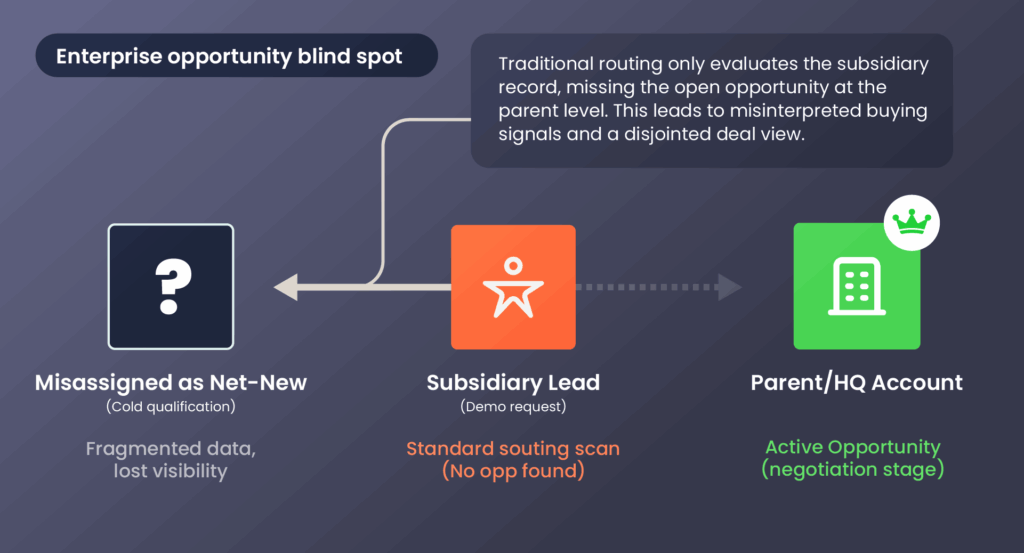
In many enterprise deals, the opportunity exists at the Parent/HQ level (where the budget and contract sit).
But new leads can come in from regional branches and subsidiaries (where the actual users sit). And because traditional routing doesn’t look across the account hierarchy, they scan the subsidiary record, see no open opportunity, and assume the interaction is net-new.
So a common scenario that ends up happening is this:
- Your ENT AE is negotiating a contract with a parent company.
- Someone at a wholly owned subsidiary books a demo.
- The subsidiary record shows no open opps, even though the parent has one.
The result is a misassignment. The subsidiary prospect goes for cold qualification. The routing system doesn’t recognize that this engagement is part of a parent-level deal already underway.
But the consequences don’t stop at a single misassignment.
When activity from important stakeholders gets logged under the wrong part of an account structure, it causes:
- Your AE to lose visibility into signals that shape both the current opportunity and the long-term relationship.
- RevOps teams miss critical data points that inform renewal planning, expansion readiness, and NRR modeling.
- Fragmented understanding of engagement across the buying committee, making the deal harder to forecast and the account harder to grow.
These blind spots are endemic to traditional routing systems, which only evaluate accounts directly tied to leads, not the broader account structure shaping the deal.
And when that happens, important buying signals get misinterpreted as cold inbound activity instead of reinforcing your active opportunities.
When our sellers were looking for an account to associate an opportunity to, they would either spend time Googling or just create a duplicate — and that was our big problem.
Eric Chapman, VP of Sales Operations and Enablement at Hexagon
We had folks creating duplicate accounts, thousands of them a month, around the world.
Why Native Salesforce Hierarchies Aren’t Enough
Hierarchy-based routing depends on having a hierarchy that is accurate, complete, and usable for automation.
But a problem we see many orgs running into is believing that Salesforce’s native account hierarchies already give them what they need.
It’s a common assumption, and it highlights an important difference between seeing the hierarchy and actually using it in your GTM.
Native Salesforce hierarchies are largely visual, not operational.
The account hierarchies you see inside Salesforce only shows relationships, they don’t do anything with them.
That matters because even though Salesforce hierarchies can display a parent–child relationship, it can’t interpret that relationship for ownership, assignment, or opportunity awareness.
Several more limitations also get in the way with native Salesforce hierarchies:
- You have to enter hierarchy data manually. Each parent–child link depends on someone populating the Parent Account field, and those links fall out of date as companies grow, split, or get acquired.
- Salesforce provides no validation or ongoing maintenance. Native Salesforce hierarchies don’t flag mislinked, unlinked, or duplicated accounts, so structural errors compound over time.
- Automation cannot read the hierarchy natively. Routing engines don’t reference parents or children unless teams build custom flows, lookups, or Apex.
- Routing engines also can’t see opportunity context across the hierarchy. Even when the hierarchy appears in the UI, Salesforce limits opportunity checks to the single account record unless teams add additional architecture.
[Native Salesforce hierarchies] would require a sales rep to go into related objects, drill down, look at the opportunities, go back and go back again, look for a contact.
Eric Jim Maddison, Principal Business System Analyst at Veracode
A lot of back and forth, and you can lose people or records through the shuffle.
[Complete Hierarchies] has made it very simple for people to find all the information within one little screen.
For many teams, these feature gaps only become obvious when they start evaluating whether to build vs buy account hierarchies in Salesforce.
And this is only in the context of hierarchy-based routing.
These limitations barely scratch the surface of the broader constraints inside native Salesforce hierarchies.
If you want to explore those broader limitations — including restricted hierarchy views, rigid structures, and weak roll-up reporting — we break them down in detail in our overview of the three core limitations of native Salesforce account hierarchies.

On-Demand Demo: Build vs. Buy Hierarchies (and How AI Can Help)
Ready to dig deeper into the build vs. buy decision?
Watch our on-demand session with Klaviyo and the Traction Complete team as they unpack the real costs of building hierarchies and how automation improves visibility, territory design, and NRR.
Why exceptions and manual workarounds don’t scale
Given all the limitations Salesforce’s native hierarchies have, the natural conclusion is to build exceptions manually.
And on paper, this sounds like a no-brainer: if the account is a subsidiary of a strategic parent, route it differently.
But in practice, creating even one exception immediately adds more complexity and manual work. Here’s why:
You have to create hierarchies manually
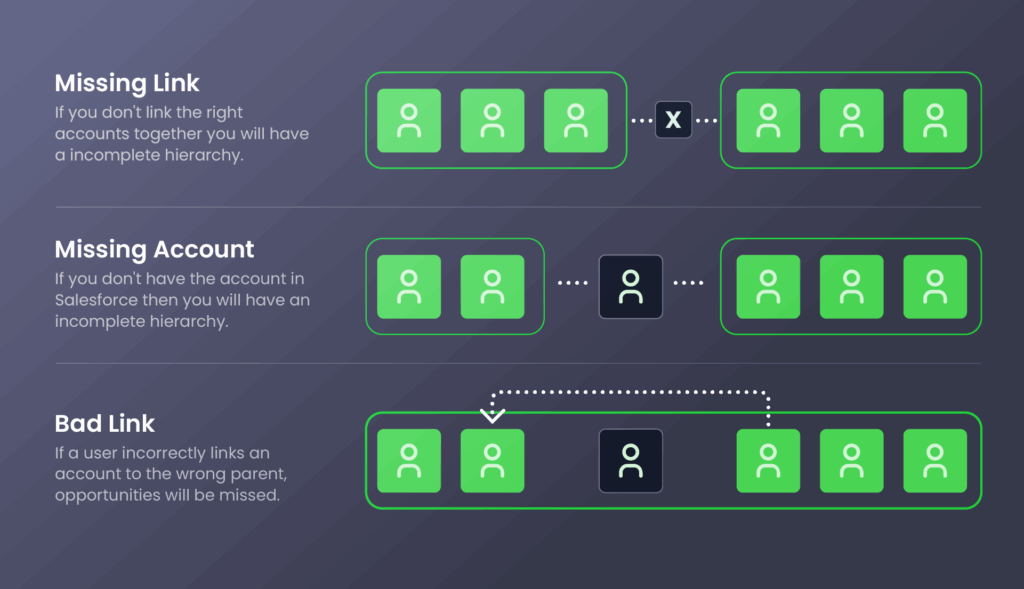
You might have hierarchy data from D&B or ZoomInfo, but you still have to create those relationships manually in Salesforce. That means linking each child account directly to its parents and repeating that step all the way up.
And when even one piece is off, the entire hierarchy breaks:
- Missing link. If you forget to connect two related accounts, the hierarchy becomes incomplete.
- Missing account. If a required parent account doesn’t exist in Salesforce, you can’t build the hierarchy at all.
- Bad link. If someone links an account to the wrong parent, the error cascades downward, creating incorrect rollups, missed opportunities, and territory conflicts.
You need increasingly complex flows and custom apex
Let’s say you build the perfect Salesforce-native hierarchy: no missing links, accounts, or bad parents. Even with all that painstaking work completed, you still essentially have a visual diagram.
Salesforce doesn’t use these relationships for routing, ownership, or assignment. Which means you need to layer automation and logic on top of it.
Most teams start with Salesforce flows. They:
- Build if-then branches to route leads based on parent–child relationships,
- Use lookup fields to pull in hierarchy context,
- Add custom objects to store alternate hierarchy definitions, and
- Stitch all of it together to help the flow “see” how accounts relate.
And it works, at least at first. But every exception makes the flow heavier.
So when Salesforce flows hits its limits, developers get called in to layer on custom apex. Developers and admins:
- Write triggers to fetch parent accounts and compare hierarchy values,
- Validate relationships across multiple records, and
- Query related opportunities Salesforce Flows can’t reliably reach.
All this additional complexity inevitably introduces tech debt and maintenance overhead. And under heavy loads, they can even trigger the Apex CPU time limit exceeded error, stopping all your automation dead in its tracks.
If somebody were to come and try to change some of the logic we would have to decide: Do we spend four weeks doing custom development, testing, and roll out?
Christina Tomaselli, Associate Director of Technical Operations and Enablement at Olive Tree Holdings
You only get one hierarchy view
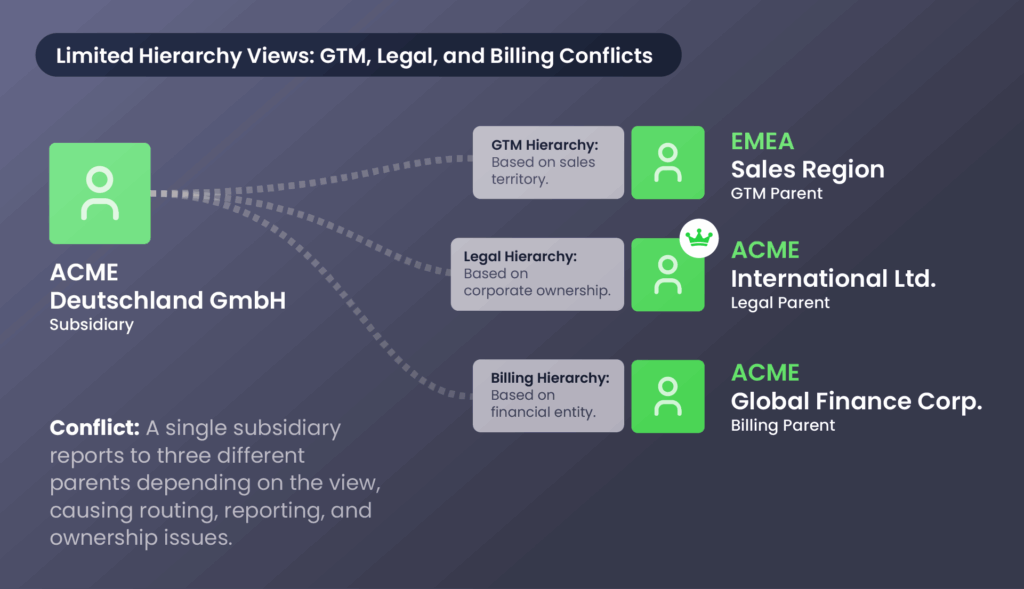
You can create perfect account hierarchies, and you can build all the flows, lookups, custom objects, and Apex needed to operationalize those hierarchies.
But even with all that effort, native Salesforce still limits you to one hierarchy view. Which means:
- You can’t model multiple hierarchy views. An enterprise org’s legal structure varies vastly from the sales GTM hierarchy your team uses to drive revenue.
And if your teams can’t switch between legal, financial, and GTM views, they’ll lose visibility into how accounts relate across the business and struggle to align sales motions with the real-world structure of their customers. - You can’t route using multiple relationship decisions. GTM motions often require routing based on different relationships: legal ownership, commercial ownership, regional coverage, partner involvement, or product-specific structures.
A single linear hierarchy can’t represent all of those at once, so routing rules lose important context. - You can’t report across different hierarchy types. Ops teams need to roll up ARR by legal entity, opportunities by territory, or engagement by buying group.
Native Salesforce ties every report to the same single structure, limiting what you can measure and how accurately you can plan. - Any change disrupts the entire model. If you repurpose the one hierarchy for a new GTM motion, you lose visibility into the previous structure, along with the routing logic, flows, and reports that relied on it.
We had over 4 million customer records, and no way to accurately organize accounts or group service locations together.
Scott Ellsworth, VP of Sales Operations at Windstream
Operationalizing Account Hierarchies with Traction Complete
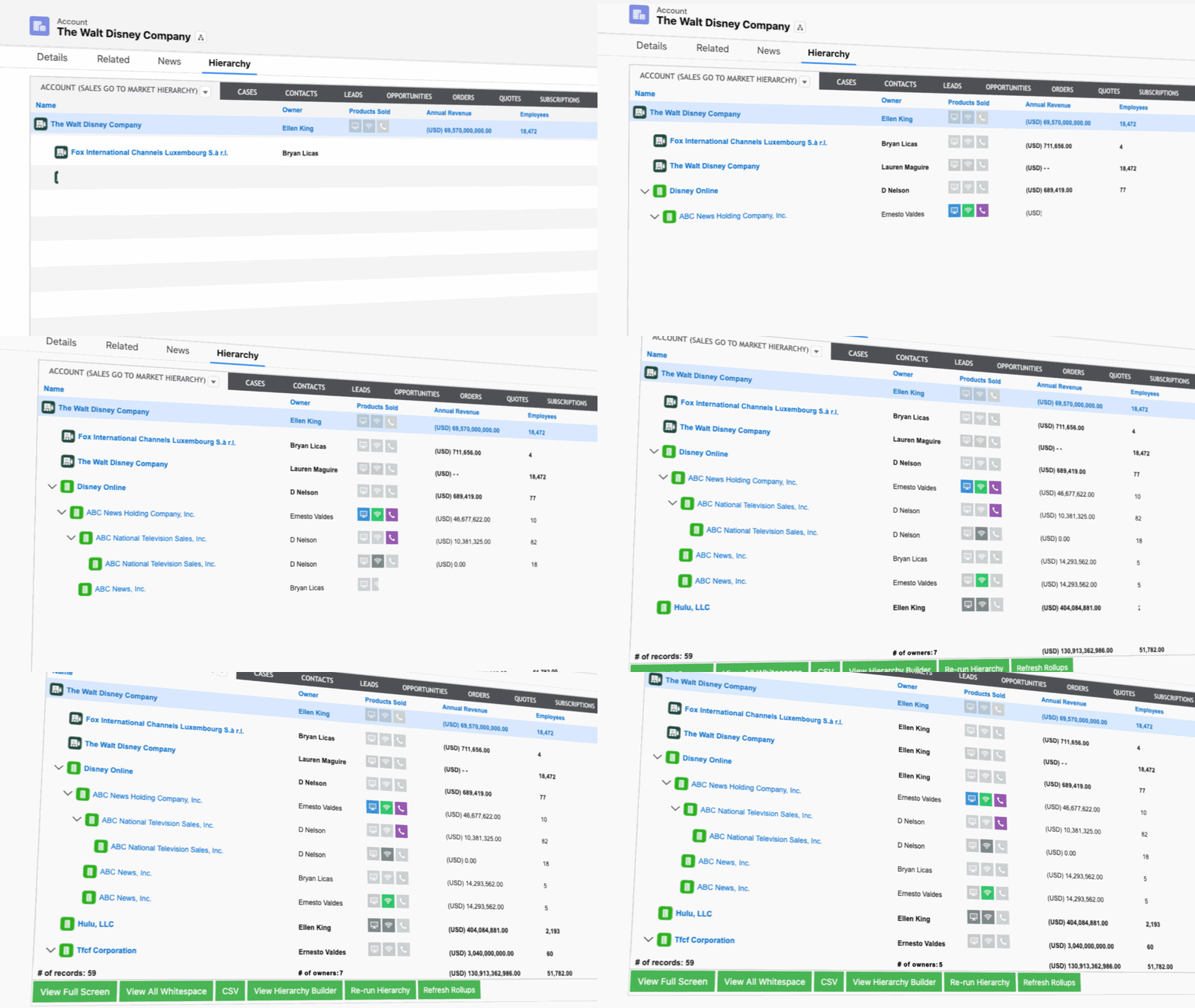
Hierarchy-based routing only works when the underlying data underneath it is clean, connected, and operational.
For many teams, that’s the friction point: native Salesforce can show relationships, but can’t use them to drive any automation.
And once you add exceptions, custom flows, and APEX code to bridge the gap, your whole system becomes fragile.
But stability is just the baseline.
To actually scale and move at the speed of your business, your account hierarchies need automation, accuracy, and consistency.
Here’s how Traction Complete helps you operationalize account hierarchies:
- Custom hierarchy views reflect your actual GTM and sales structure. Because Complete Hierarchies supports multiple hierarchy models, you can organize accounts by legal structure, commercial ownership, or territory alignment.
Multiple hierarchy perspectives empower teams to work through the lens that best supports their motion, rather than forcing their process to align with Salesforce’s default hierarchy. - Rollup reporting consolidates activity and data across the entire account family. Once accounts are properly linked, Complete Hierarchies can surface revenue, open opportunities, and engagement across parents and subsidiaries in a single view.
And when all related activity rolls up into one view, evaluating coverage, engagement, and growth potential gets much easier.
- Hierarchy-aware routing keeps your assignments aligned with enterprise motions. With Complete Leads, assignment rules consider parent ownership, opportunity activity, and account strategy across the hierarchy, not just what’s present on the child record.
- Automated maintenance keeps your hierarchies as companies grow, merge, and restructure. Complete Hierarchies integrates with third-party data providers like D&B and ZoomInfo to automatically build, manage, and update account structures as they change.
You avoid the litany of manual fixes, and your routing, ownership, and reporting stay tied to a clean and up-to-date customer view.
How Complete AI Takes Account Hierarchies Even Further
Many RevOps enterprise AI trends promise the moon, but the majority fall short because they can’t integrate into the daily workflows that teams actually use.
We take a different approach by focusing on that operational layer, strengthening your data foundation while reducing manual upkeep. Here are some field-tested ways Complete AI takes your hierarchies further:
- AI-augmented account enrichment. A single flow step leveraging Complete AI instantly populates firmographic details such as NAICS codes, revenue ranges, and employee counts, giving you up-to-date information you can act on right away.
- Automatic parent–child identification. Complete AI analyzes language and naming patterns to infer likely parent–child relationships, helping you fill structural gaps that manual research and third-party data providers may miss.
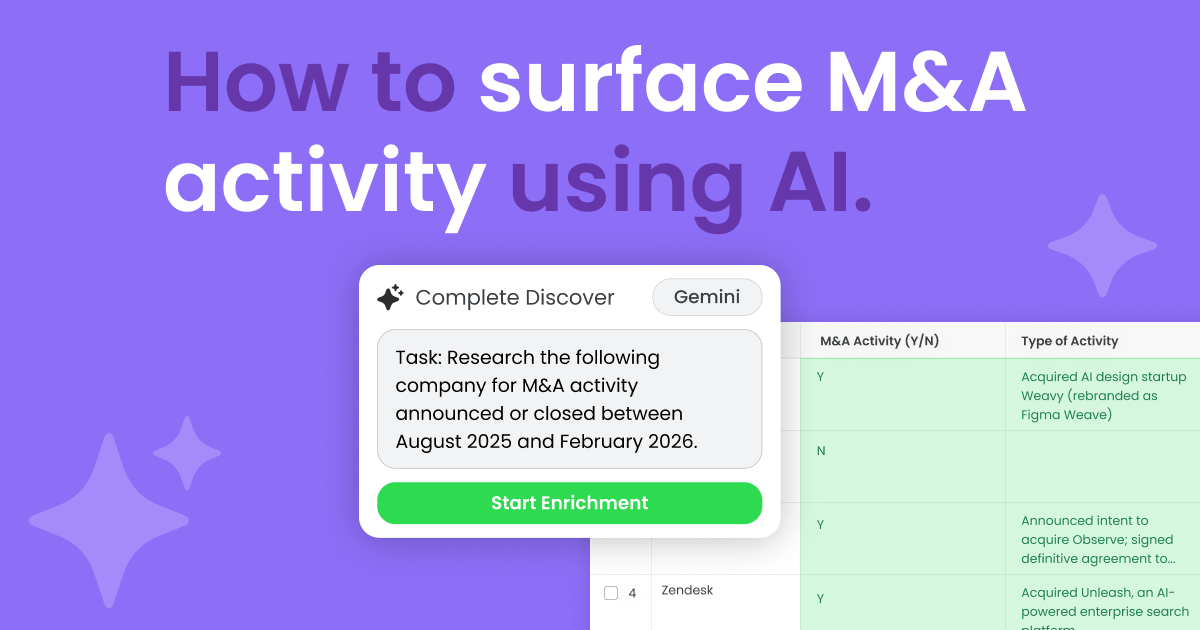
- AI-generated account hierarchy insights. Complete AI scrapes news and online sources for corporate mergers, acquisitions, and restructuring, and recommends hierarchy updates as they happen, so you operate from the most current account context.
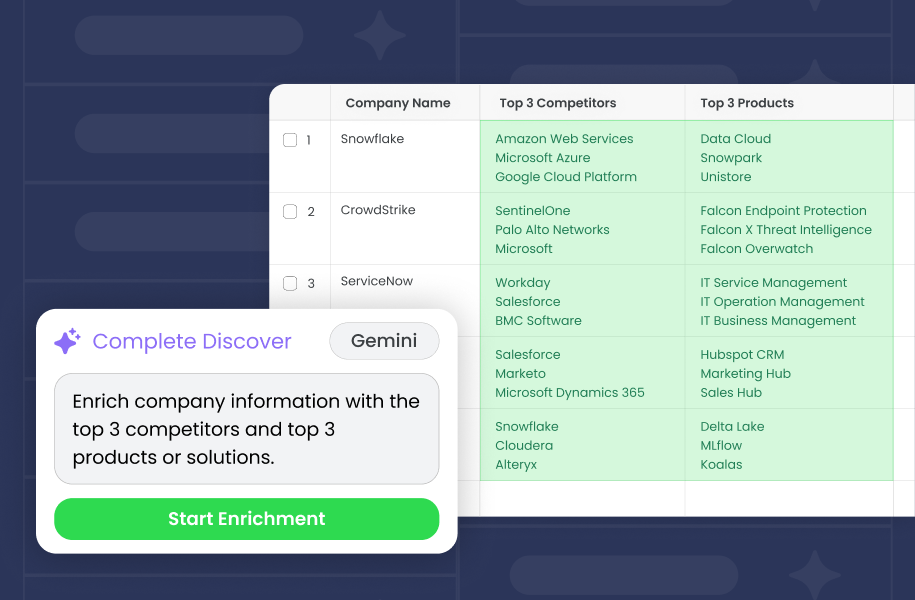
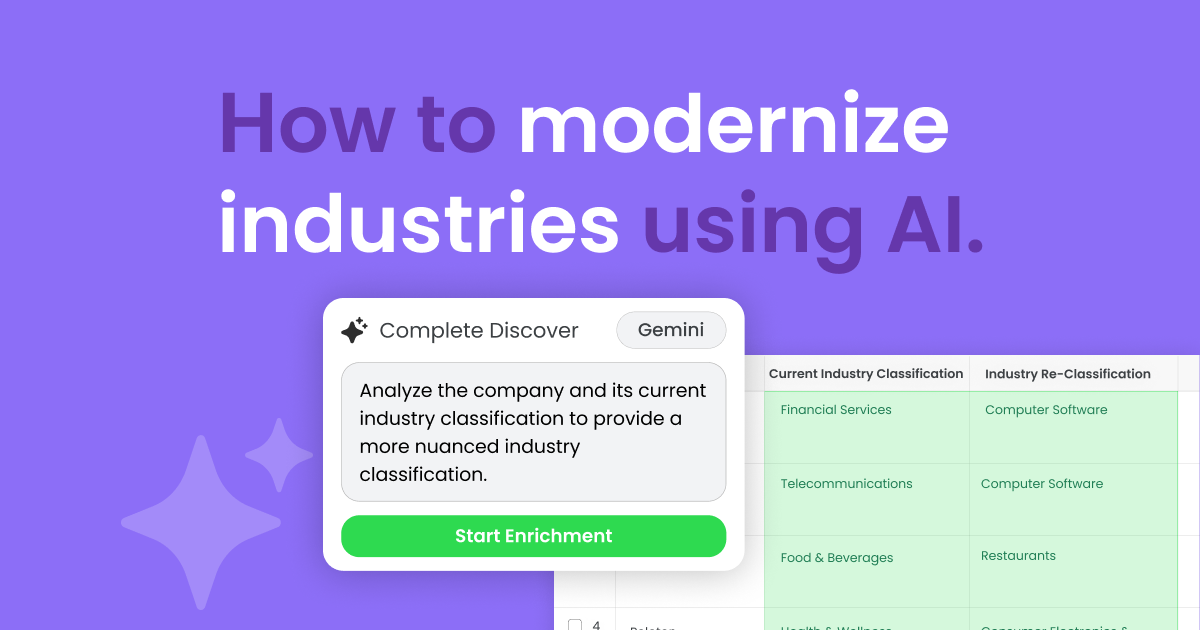
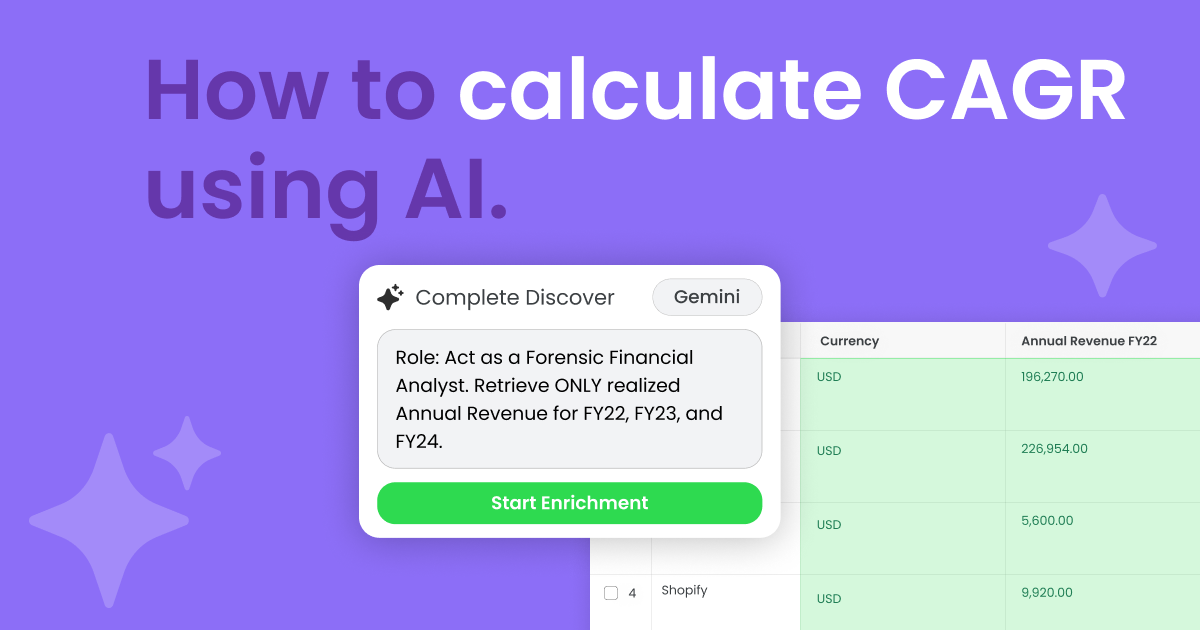
- Automated account research. Complete AI helps fill in any Salesforce field you choose with information like M&A activity, business descriptions, and YoY revenue changes.
All enriched context lands on the account record, so teams get the information they need without manual research or juggling external tools.
And because they plug directly into your pre-existing workflows, you can run these AI RevOps automations every day and reap the benefits immediately.
Stronger Hierarchies, Smarter Hierarchy-Based Lead Routing
Hierarchy-based lead routing is only as good as the hierarchies supporting it.
When your account structures stay clean, connected, and current, everything from routing to reporting to NRR strategy becomes more reliable.
With Traction Complete, RevOps teams stop fighting Salesforce’s limitations and start building an operational engine that scales with them.
If you want account hierarchies that finally match the complexity of your customers, book a demo today and see what Traction Complete makes possible.