
When your operations depend on account hierarchies, choosing how to implement them becomes a strategic decision.
Do you build those hierarchies yourself, or invest in a solution that does it for you?
For many teams, the instinct is to build.
It’s accessible, adaptable, and leverages the native tools Salesforce already offers.
But as your account data grows and your revenue operations evolve, the trade-offs become clearer — from ongoing maintenance and edge-case logic to scaling visibility across departments, territories, and systems.
To make the right call, you need to understand what building really takes — and what “buying” an automated solution can unlock.
What Building Account Hierarchies Actually Means in Salesforce
Building means populating the Parent Account field on every child record that should sit beneath a parent. Two ways to do it:
Connecting account hierarchies manually
An admin opens each child account, picks the parent, saves. Repeat for every link.
At 50 accounts, that’s an afternoon. 500? A recurring project, maybe once a quarter. Approaching 2,000 or more, it’s someone’s full-time job.
Building account hierarchy automations with Flow Builder or Apex
A trigger (a new lead, an enrichment event, a domain match) writes the Parent Account field automatically. The build requires real engineering, but the work that burns through weeks are the edge cases:
- Matching logic. Enrichment vendors return parent company name, D-U-N-S number, or domain. Your Flow has to map that to an existing Account or create one.
Name matching alone is a minefield.
“Microsoft Corporation” vs “Microsoft” vs “Microsoft Corp.” are the same company in the real world and three different accounts in Salesforce unless you build logic dictating otherwise. - Hierarchy depth and roll-ups. Salesforce supports deep account hierarchies, but native roll-up summary fields only cascade through one parent relationship at a time.
For deep, multi-level hierarchies (enterprise conglomerates with 5+ levels) you either need custom roll-up Apex or have to accept worse reporting. - Merge events. When two parent accounts merge, Salesforce preserves one record and loses the other.
Child accounts pointing at the losing record orphan themselves unless your Apex trigger catches the merge event and re-parents them.
Account merges don’t fire standard Flow triggers, which means you need an Apex Merge handler or manual cleanup. - CPU limits. Cascading hierarchy updates across deep trees regularly trigger Apex CPU time limit exceeded errors on orgs with 10,000+ accounts.
- Circular reference prevention. Your Flow has to check that setting A as the parent of B doesn’t create a loop where B is upstream of A. Salesforce doesn’t enforce this natively.
Ultimately, whether you’re building account hierarchies by hand or coding an ad-hoc solution, both approaches have the same ceiling.
Salesforce gives you one Parent Account field per record, which means one hierarchy view per account.
So if Finance needs the legal entity hierarchy (who owes whom money), Sales needs the territory hierarchy (who owns what), and Marketing needs the brand family (who shares a campaign budget), native Salesforce account hierarchies limitations makes you pick one and work around the others.
Relying on your sales organization and all the different people that are inputting manually into the system to accurately create a hierarchy of accounts and maintain that data is a very unreasonable and very time-consuming request that will never materialize to what you want.
Rusty Jensen, Head of Global ISR Sales at Conga
When Building Account Hierarchies Makes Sense
Building Salesforce account hierarchies manually works under specific conditions. If your org meets the criteria, DIY is a reasonable choice:
| Criterion | Build wins when | Buy wins when |
|---|---|---|
| Account volume | Account base is steady, reviewable in a manual quarterly audit | Account base steadily growing and keeps outrunning manual maintenance |
| Hierarchy views required | One structure works for every team | You need 2+ views (legal vs GTM vs billing) |
| Account change rate | Stable ownership, rare M&A | High churn, frequent mergers, reorgs, or rebrands |
| What hierarchy data feeds | Rep awareness and ad-hoc reports | Routing, ABM plays, NRR reporting |
| Admin capacity | Have at least 1 Full-Time Equivalent (FTE) Salesforce Admin to own hierarchy upkeep | Admin team already at capacity |
| RevOps maturity | Early stage, still defining what hierarchies you need | Mature, the business runs on known hierarchy structures |
If you run an account hierarchy audit and your org fits the left column across all six rows, native Salesforce handles it fine. Populate the Parent Account field, teach your team to update it when things change, and move on.
But splits happen, and most orgs don’t sit cleanly in one column. The problems start when conditions shift toward the right column, even on just one or two rows.
What Buying Account Hierarchies Actually Means (and what it doesn’t)
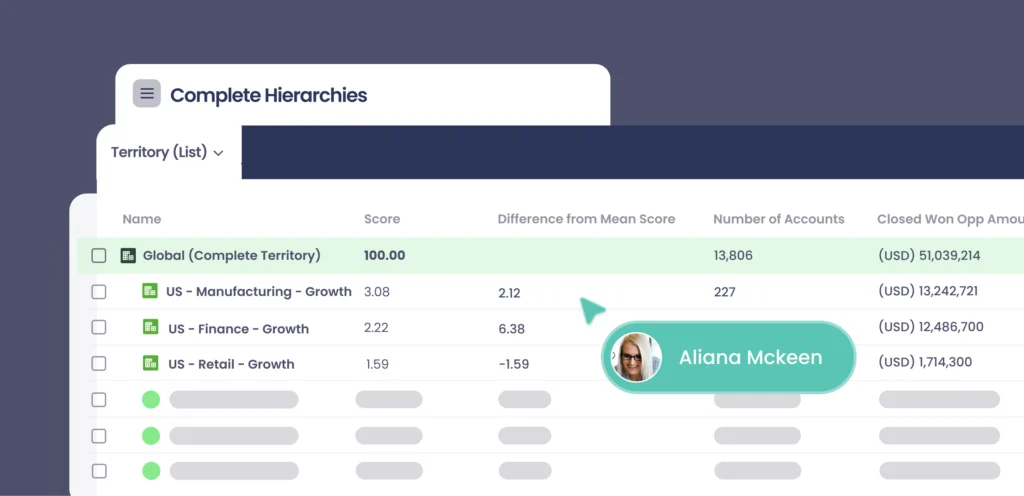
Most teams hear “buy a hierarchy tool” and think data enrichment. But third-party data providers like Dun & Bradstreet and ZoomInfo only supply account hierarchy data as metadata, not as a functioning Salesforce account hierarchy.
So the data might tell you Alphabet owns Google, but until someone builds the automation to populate the Parent Account field, the two records stay disconnected.
It’s confusing because three different things get called “buying a hierarchy solution,” but solve different problems.
So your choice really comes down to what’s broken:
- Missing corporate family-tree data means you need enrichment
- Correcting data going stale inside the native Parent Account field means you need a sync overlay
- One hierarchy view that doesn’t serve every team means you need a platform built for multiple views
Teams going through build-vs-buy usually discover they need some combination.
Row-three platforms (Complete Hierarchies is one) are built for that combination: data integration, automated sync, multi-view support, and increasingly AI-augmented hierarchy detection, all in a single system.
Our sales model … [makes it] very important for sales reps to be able to see all the subsidiaries under a particular account.
Jim Maddison, Principal Business System Analyst at Veracode
Complete Hierarchies has allowed us to do that in a very scalable way.
Where buying closes the gap
Each “buy wins” row in the scorecard maps to a specific gap the build path structurally can’t close. Three show up most often in buy decisions.
When teams need different hierarchy views
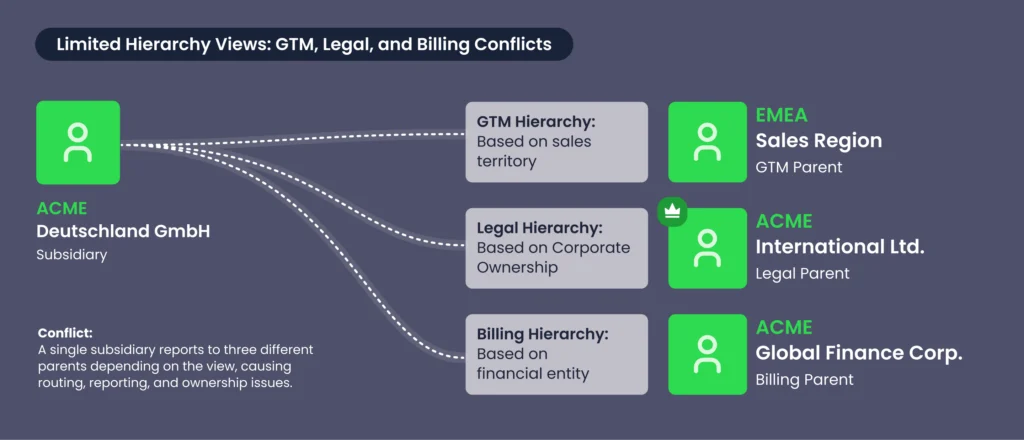
Salesforce’s one-Parent-Account-field constraint forces a team-level compromise on the build path.
Finance picks the legal hierarchy. Sales loses the territory view. Marketing builds workarounds.
If the scorecard’s hierarchy-views-required row tipped “buy wins” because Finance, Sales, and Marketing each need accounts through their own lens, the specific capability you’re paying for is native multi-view support.
When account relationships change faster than admins catch
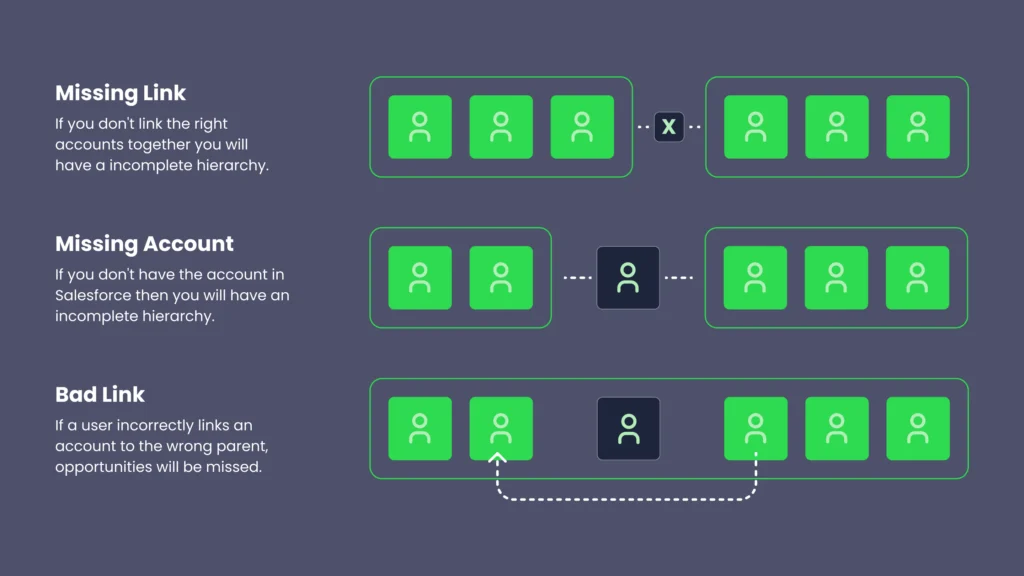
If the scorecard’s account-change-rate row tipped “buy wins” because you’re managing frequent mergers, reorgs, or rebrands, the capability you’re paying for is change detection.
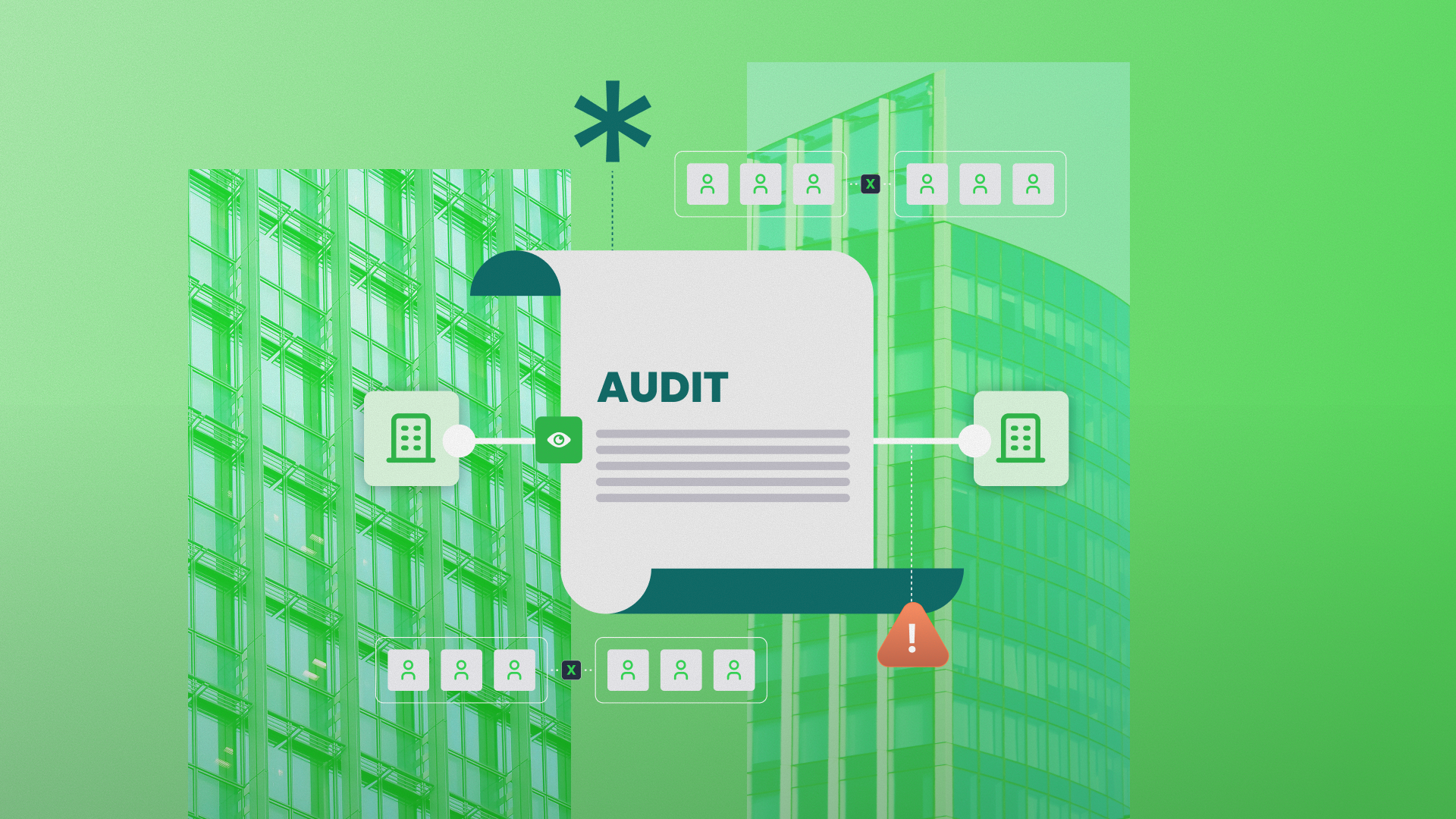
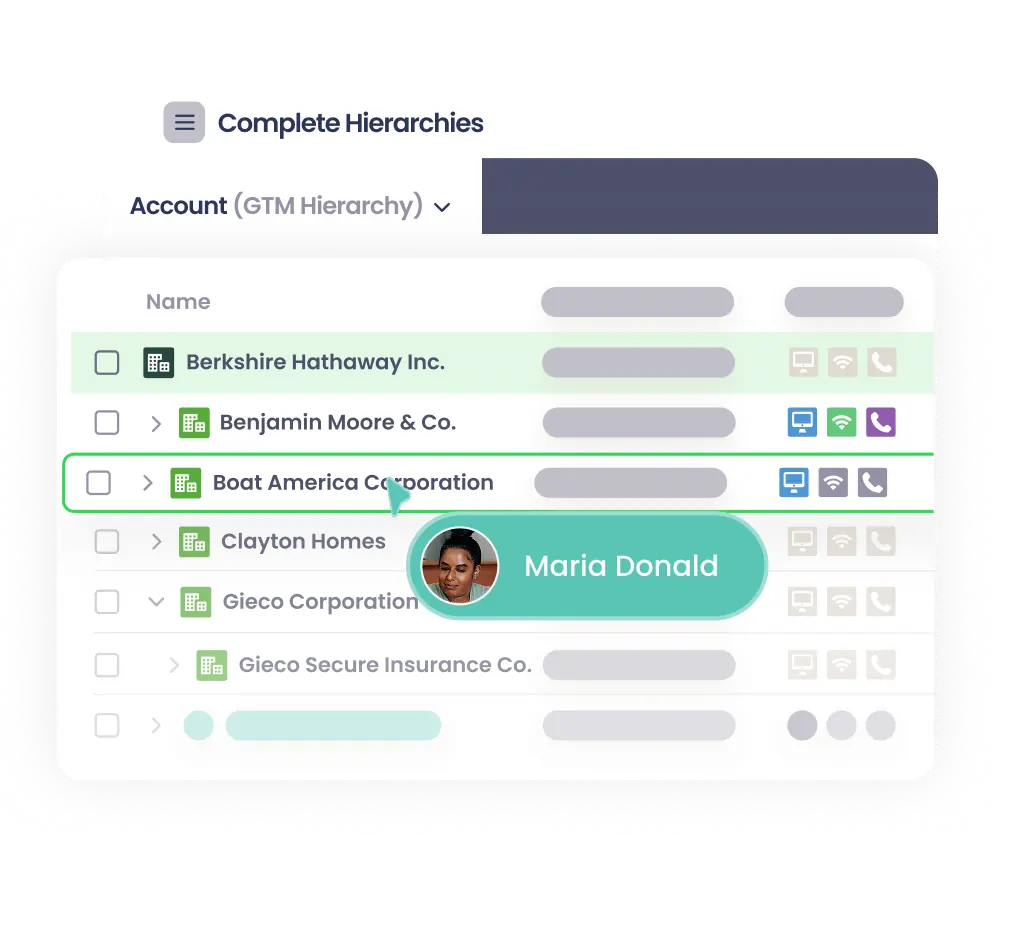
An automated hierarchy management solution like Complete Hierarchies watches for the change signals and updates relationships before the rep has to file a ticket. Doing so also saves you the manual trouble of manually chain-linking the parents and children together. Which, as the above image illustrates, is perilous at best.
When hierarchy data has to feed other workflows
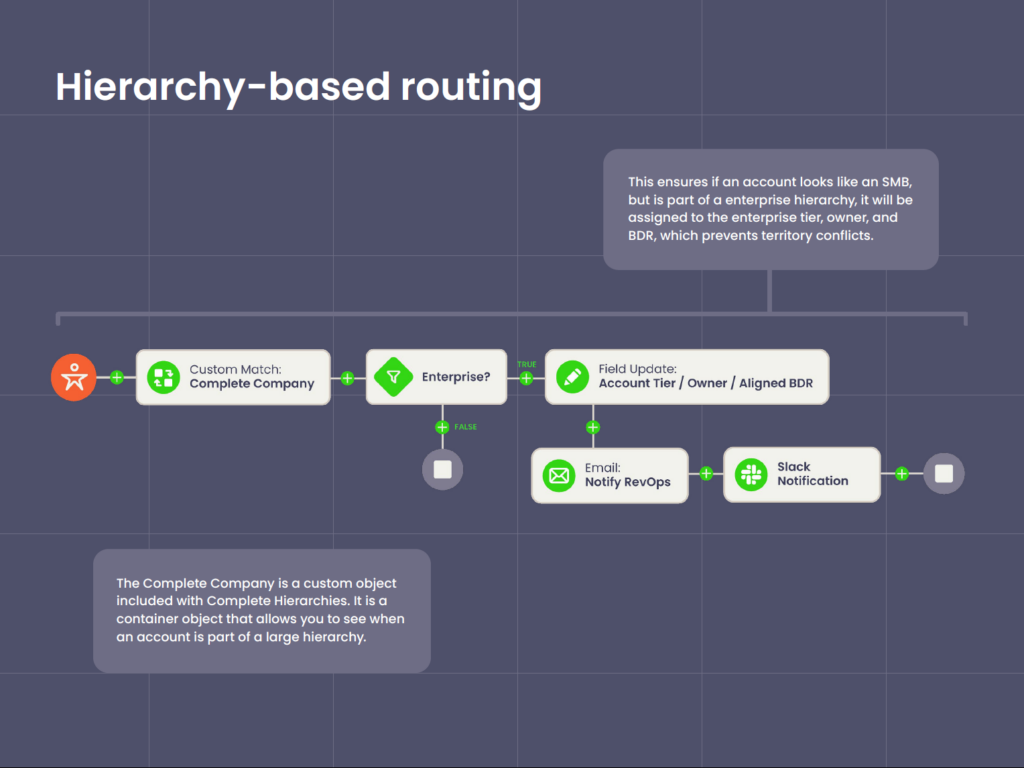
Native Salesforce stores hierarchy in the Parent Account field and leaves it there.
Routing rules don’t read it, so hierarchy-based lead routing is out of the equation. Roll-up reports don’t cascade beyond one level. Forecasts don’t group subsidiaries into their parent.
If the scorecard’s what-hierarchy-data-feeds row tipped “buy wins” because routing, account based marketing (ABM), compensation, or net retention rate (NRR) reporting depends on accurate hierarchy, native
Salesforce isolates that data layer. A platform exposes it to the downstream workflows that need it, without custom Apex.
Something like this in the past would require a sales rep to go into related objects, drill down, look at the opportunities, go back and go back again, look for a contact.
Jim Maddison, Principal Business System Analyst at Veracode
A lot of back and forth, and you can lose people or records through the shuffle.
[Complete Hierarchies] has made it very simple for people to find all the information within one little screen.
What About a Hybrid Approach? (Buy Data, Build Sync)
Some teams split the middle: buy account hierarchy data from an enrichment vendor, build the Salesforce-side sync in Flow or Apex themselves.
Taking this approach lets you skip the matching problem (the vendor gives you parent DUNS numbers and Global Ultimate DUNS linkages) while keeping the sync logic inside your org where your admin controls it.
The hybrid path works under specific conditions and breaks under others. The two sides rarely line up row-by-row, so read each column on its own:
| Hybrid works when | Hybrid breaks when |
|---|---|
| One hierarchy view serves every team. | Your enrichment data diverges from the parent relationships your sales team actually uses. |
| Your enrichment vendor’s parent coverage matches your actual account list. | The vendor updates data on a schedule that doesn’t match your Salesforce sync cadence. |
| You have a Salesforce developer, not just an admin. | Your syncs hit Apex governor limits. |
Comparing Build-vs-Buy Costs
Buying a platform shows up as a recurring line item in your budget. Building shows up as recurring admin time: every parent-child link has to be created, updated, validated, and audited.
But as account volume grows, both scale, just not at the same rate.
- Build-side admin hours compound with every new account and every change.
- Buy-side pricing typically scales in steps tied to contract tiers.
Where they diverge is when someone notices a problem.
For the build path, it’s delayed and manual: a rep flags a wrong parent, or a report surfaces numbers that don’t match the org’s real structure. That usually means the error has already affected pipeline reports or routing decisions by you notice.
When you buy an account hierarchies solution, errors get caught when they happen because the whole system is automated.
| Dimension | Build (native + Flow) | Buy (automated platform) |
|---|---|---|
| Upfront cost | Genuinely the cheapest at setup. No license, admin time only. | License plus implementation, scoped per contract. |
| Ongoing effort | Admin hours scale with volume and change rate. Can compound into dedicated headcount at enterprise scale. |
Platform absorbs the maintenance. Admin effort stays roughly flat as volume grows |
| Control and customization | You own the logic completely, but changes can be slow, fragile, and must be maintained. | Fully customizable through app-level configuration. Customer success partners on complex logic and edge cases. |
| Scale ceiling | Salesforce’s one-Parent-Account-field constraint becomes a hard ceiling when teams need different views. | Purpose-built for multi-view (GTM, Legal, Billing, etc) from day one. |
| Failure mode | Errors compound without surfacing until something visible breaks, typically weeks after the original mistake | Fewer errors overall. |
At smaller companies with stable ownership, manual maintenance holds.
A few parent-child links, a handful of territories, minimal reorgs. The build path is legitimately cheaper at this scale, because license fees would be paying for capacity you don’t use.
The easy drag and drop [feature from Complete Hierarchies] allows our sales operations team to maintain regional ownership when cleaning up complex hierarchies, which is very important for us because we want to make sure that our sales team is aligned with our rules of engagement.
Heidi Davis, Manager of Sales Operations and Global Data at Zoom
For fast-growing or enterprise teams managing thousands of accounts, the math changes.
Admin hours compound faster than license fees, and the structural limits of native Salesforce (single parent field, limited roll-ups) start to cost more than a platform that works around them.
Where to Go Next with Your Account Hierarchies
Whether you’re just starting to build your first account hierarchies or untangling years of patchwork logic, one thing is clear: how you structure Salesforce account relationships has far-reaching impacts on sales execution, territory alignment, and revenue forecasting.
Manual methods and enrichment data can only take you so far.
As your business grows — and your GTM motions evolve — you need a system that not only reflects real-world complexity, but adapts to it automatically.
Complete Hierarchies is purpose-built for that challenge.
It’s the first no-code, Salesforce-native solution that empowers you to build, customize, and maintain multiple hierarchy views directly within your CRM — without relying on dev resources or clunky code.
That means fewer workarounds, fewer data chores, and a CRM that finally reflects how your business actually operates.
Are you ready to move from manual to scalable?
Book a demo and see how Complete Hierarchies helps you build smarter, sell faster, and stay aligned — no matter how complex your accounts become.

On-Demand Demo: Build vs. Buy Hierarchies (and How AI Can Help)
Ready to dig deeper into the build vs. buy decision?
Watch our on-demand session with Klaviyo’s Lead Systems Architect, Traction Complete’s Product Marketing Manager, and Pre-Sales Director as they break down the real costs of building hierarchies, how automation and AI fill in the gaps, and why better hierarchies drive whitespace visibility, territory design, and accurate NRR.
Frequently Asked Questions
Build vs Buy Salesforce Account Hierarchies: FAQ
-
Can Salesforce handle multiple hierarchy views natively?
-
No.
Salesforce gives you one Parent Account field per record, which means one hierarchy view.
If you need separate views for legal entity, territory, and billing, you have three options: pick one and build the others as workarounds with custom objects, run parallel reports outside the hierarchy, or buy a platform that supports multi-hierarchy structures natively.
-
What’s the difference between buying data and buying a hierarchy platform?
-
Data vendors like Dun & Bradstreet or ZoomInfo sell you corporate family-tree information: parent D-U-N-S numbers, Global Ultimate DUNS linkages, and legal entity relationships. They don’t write that data into Salesforce or keep it current as accounts change.
A hierarchy automation platform takes whatever data source you have (your own, a vendor’s, or a combination) and maintains the hierarchy structure inside Salesforce as relationships change, exposes the structure to downstream workflows like routing and reporting, and lets you override automated relationships where the rep knows better than the data.
You usually need both categories, and they solve different problems.
-
What’s the difference between an enrichment + sync overlay and a hierarchy automation platform?
-
An enrichment + sync overlay (RingLead, Kernel-style sync tools) writes corporate family-tree data into Salesforce’s native Parent Account field on a schedule.
An enrichment + sync overlay fixes the data: the right parent shows up in the right field without an admin updating it by hand. RingLead and Kernel-style tools don’t fix the architecture: you still get one hierarchy view per account, one-level roll-up cascades, and no override governance.
A hierarchy automation platform like Complete Hierarchies builds a custom global ultimate structure inside Salesforce. That’s typically a separate Account-related object plus governed custom fields like Global Ultimate Parent and Hierarchy Tier. The structure supports multiple hierarchy views in parallel (legal, territory, billing, brand family), multi-level roll-ups without custom Apex, rep-level overrides where the rep knows better than the data, and hierarchy-aware routing.
-
Does buying a hierarchy platform replace our Salesforce admin?
-
No.
The admin’s role shifts from maintaining parent-child relationships and patching Flows to owning platform configuration, managing exceptions, and handling integrations between hierarchy data and downstream workflows like routing, reporting, and ABM.
-
Does AI or Agentforce change the build vs buy calculation?
-
Yes, usually in favor of buy.
Agentforce agents read hierarchy data the same way humans do.
If relationships are wrong, the agent acts on wrong relationships at machine speed, and the failures are harder to catch because there’s no human in the loop to notice the wrong parent account.
Specific failure modes we’ve seen when hierarchies and AI workflows collide: support cases routed to the regional team for a subsidiary that moved to a different territory six months ago, ABM scoring treating each subsidiary as a separate account instead of one buying family, and pipeline forecasting double-counting opportunities that belong to the same parent.
Clean, maintained hierarchies become a dependency for every AI workflow on top of Salesforce, which raises the cost of a build path that goes stale between maintenance cycles.
-
Can Salesforce roll-up summary fields aggregate revenue across all levels of an account hierarchy?
-
No.
Native roll-up summary fields only cascade through one parent relationship at a time, and they only work on master-detail relationships.
The Parent Account field is a lookup, not master-detail, so out-of-the-box rollups don’t traverse the hierarchy at all.
Multi-level rollup reporting means parent-level revenue that includes every subsidiary and sub-subsidiary. That requires either custom Apex that walks the chain, which trips Apex CPU time limit exceeded errors on orgs with large numbers of accounts, or a hierarchy management platform that handles multi-level aggregation natively (like Complete Hierarchies).
Salesforce Rollup Summary Field: 3 Limitations and Fixes -
What’s the most common reason custom-built account hierarchy automation fails at scale?
-
Three failure modes account for almost every break.
First, Apex CPU time limit exceeded errors when cascading hierarchy updates run across deep trees on orgs with large account numbers. The symptom is a Flow that fails partway through a batch without surfacing a visible error in the standard logs, leaving hierarchies in an inconsistent state until the next run catches it.
Second, account merge events: when two parent accounts merge, Salesforce loses one record and the child accounts pointing at it orphan themselves unless your Apex Merge handler catches the event.
Third, orphaned logic: when the original developer or admin moves on, nobody updates the hierarchy code, and the data drifts as account structures change.
M&A activity accelerates all three.
-
Can you automate account hierarchy building?
-
Yes.
Automated account hierarchy building can match your accounts against corporate family data, write the parent-child links, and keep the tree current as structures change.
Automated account hierarchy solutions like Complete Hierarchies does this natively in Salesforce with admin review on every linkage.
Authors
Adam Brewell, Director, Pre-Sales at Traction Complete
Vincent Lee, Technical Copywriter at Traction Complete