Intent signals. Structured outputs. One flow to route leads based on real context.
Traditional lead routing stops at firmographics – job title, company size, geography.
But this approach is blind to the why behind the form fill. If you’re routing a high-priority lead to an SDR when they actually need a technical specialist or are actively evaluating solutions, you’re losing the speed-to-context race.
In high-stakes industries like cybersecurity or enterprise software, the reason a prospect reaches out is often hidden in public signals like news reports, regulatory filings, or hiring trends. If you wait for a sales rep to manually research these signals, your speed-to-lead deteriorates.
By combining Complete Discover and Complete AI, you can move beyond simple round robin assignment and build an intent-based routing engine that interprets live web data to match leads with the most qualified rep instantly.
Here’s how to progress from basic assignment to AI-driven precision routing.
How to build intent-based lead routing using AI
As shown in the video, Complete Discover acts as an experimentation layer where you can test prompts, refine outputs, and validate accuracy before deploying anything into Salesforce.
In this use case, we:
- Source real-time intent signals using AI
- Structure those signals into usable fields
- Generate an intent score
- Use that score to drive routing decisions
Instead of routing based on static fields, we go beyond and route leads based on what’s happening inside the account right now.
- Live risk context. Identifying recent security incidents or legal filings that require immediate expert intervention.
- Growth signals. Detecting hiring trends that signal a department is ready for a new tech stack.
- Predictive intent. Assigning an “intent rating” that separates high-priority prospects from general inquiries.
Here’s how to do it step-by-step.
1. Use Complete Discover to test and refine intent signals
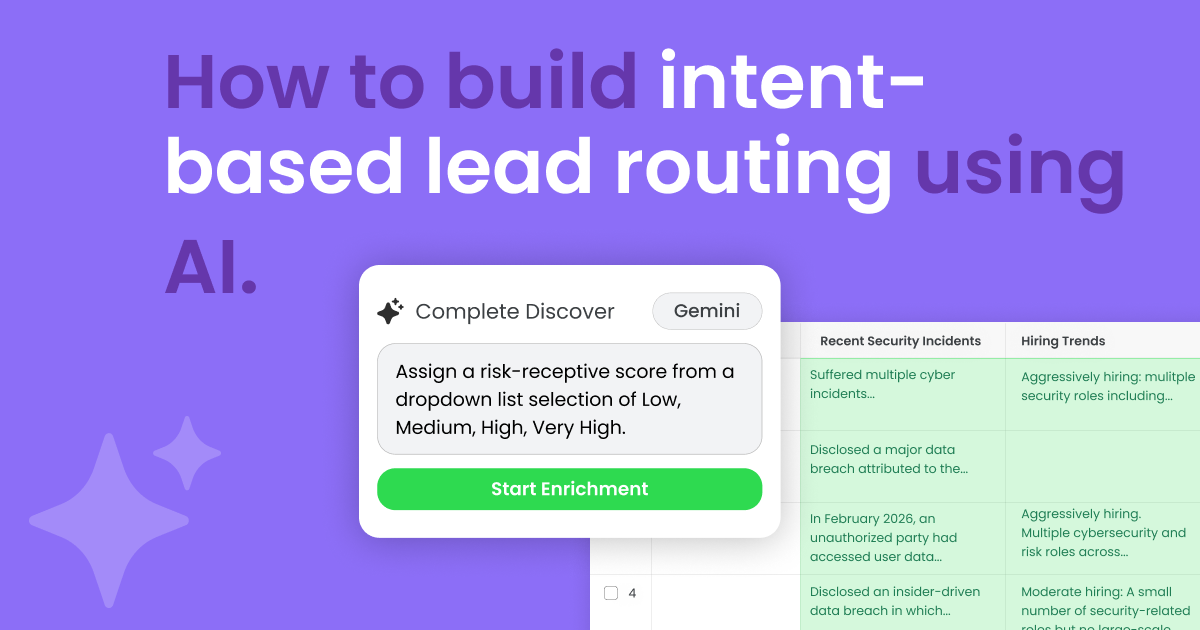
Before operationalizing any flow, use Complete Discover – a Chrome extension for Google Sheets – to experiment. You can pull data directly from Salesforce, upload a CSV, or enter account names and websites manually.
Clear, descriptive row headers provide AI with the necessary context for AI to provide each row. You can also test how different LLMs, such as OpenAI, Anthropic, Perplexity, and Google pull live web data.
In this example, our row headers include:
- Recent security incidents
- Hiring trends
- Regulatory pressure
- Intent rating
These signals provide insight into whether a company is actively facing a problem, investing in a solution, or under pressure to act.
You can also ensure the best results by refining your prompt and defining “guardrails.”
Instruct it to exclude specific competitors or only look for incidents within an allotted period of time. You can also add in Confidence Scores and Source URLs to audit the AI’s reasoning, ensuring no hallucinations make it into your CRM.
Complete Discover runs on a bring your own key (BYOK) architecture, meaning users will need an API key for their chosen vendor. By bringing your own key, you maintain full governance over data security, token usage, and costs.
2. Implement lead quality scoring and validation
Once you’re done testing in Complete Discover, it’s time to move to Salesforce.
This flow implements several AI steps using Complete AI and Complete Leads. The first AI flow step is used for quality scoring and validation.
Traditional methods typically validate field by field, but don’t consider how the data fits together. By bringing in that broader context, AI can catch more than just traditional approaches – combining name, address, and company together.
If the lead contains a:
- Nonsense company name (i.e., Stark Industries, Wayne Enterprises, Monsters Inc.)
- Throwaway domain (i.e., test@test.com, 123@qwerty.com)
- Fake name (i.e., Mickey Mouse, Abraham Lincolmn, Luke Skywalker)
The lead is automatically rejected, marked as invalid and doesn’t proceed through the enrichment or routing parts of the Flow Step.
Not only does this avoid wasting tokens on junk leads, it prevents them from taking a sales reps’ spot in a round robin.
3. Enrich leads with verified AI prompts
Once a lead is validated, another AI step is used to perform standardization and enrichment. This is when records become enriched with valuable information that wouldn’t be included in data sets from traditional providers.
Simply copy and paste the designated prompts from Complete Discover into the additional fields of this step.
In addition to standardization prompts, here are the three additional prompts we used in this step.
For Recent Security Incidents:
| Act as a Threat Intelligence Analyst. Search recent news from the last 12 months for any data breaches, ransomware attacks, or major security vulnerabilities associated with the companies listed. If found, provide a one-sentence summary including the date. If none, return ‘No recent major public incidents’. |
For Hiring Trends:
| Act as a Corporate Strategist. Analyze current job openings for the companies listed on LinkedIn and their careers page. Look specifically for ‘Cybersecurity,’ ‘SOC Analyst,’ or ‘CISO’ roles. Return a brief summary (e.g., ‘Aggressively hiring: 5+ security roles’ or ‘Stable: No current security openings’). |
For Regulatory Pressures:
| Identify which major cybersecurity regulations the companies listed are subject to based on their industry and location. Examples: GDPR, HiPAA, PCI-DSS, or NYDFS. Format as a bulleted list. |
Within the flow, each AI step saves structured outputs to the record.
This ensures data points are saved and allows you to:
- Store enrichment results directly on the lead
- Reference those fields later in the flow
- Build routing logic based on the enriched data.
4. Generate an intent rating using AI
The next step is to translate these fields into a usable routing metric.
In this example, an intent rating is generated based on the recent incidents, hiring activity, and external pressure signals of each lead and assigns a risk receptive score of low, medium, high, or very high.
Here’s the prompt we used to generate intent rating:
| You are a Senior Security Consultant. Based on the Tech Stack, Recent Incidents, and Hiring Trends found in the previous cells, assign a risk-receptive score from a dropdown list selection of Low, Medium, High, Very High. A score High or Above indicates a ‘High Urgency’ buyer who likely needs immediate security upgrades. Provide only the score. |
Instead of relying on static lead scoring models, you’re using real-time context to determine urgency and fit.
Once again, this intent rating is saved to the lead and used in the next step of the lead assignment flow.
5. Route leads dynamically based on intent
Once the intent rating is set, routing occurs based on the previously assigned intent rating.
- Low. Route the lead to the marketing team to have them qualified or nurtured.
- Medium. Route this to an SDR in a round robin pool.
- High. Route to a security consultant.
- Very High. Route to a senior security consultant.
This routing strategy ensures that leads are assigned to the right person based on context that may not be available from traditional data providers.
It also ensures that high-intent leads are handled by the most experienced reps, while lower-intent leads are nurtured appropriately.
Evolving traditional lead routing with Complete AI
The true power of this intent-based lead routing is that it’s completely configurable.
You can adjust what determines ratings, who those leads go to, or change your source parameter as your market evolves. By the time a lead reaches a rep, the “why” is already visible on the record, enabling a more personalized outreach.
This doesn’t just improve speed-to-lead; it ensures the right lead gets to the right person with the right context – every time.
Ready to move your routing rules from static to strategic?
Book a demo to see the Discover-to-AI workflow in action.